


George Umanov
Forum Replies Created
-

Hi Oleg,
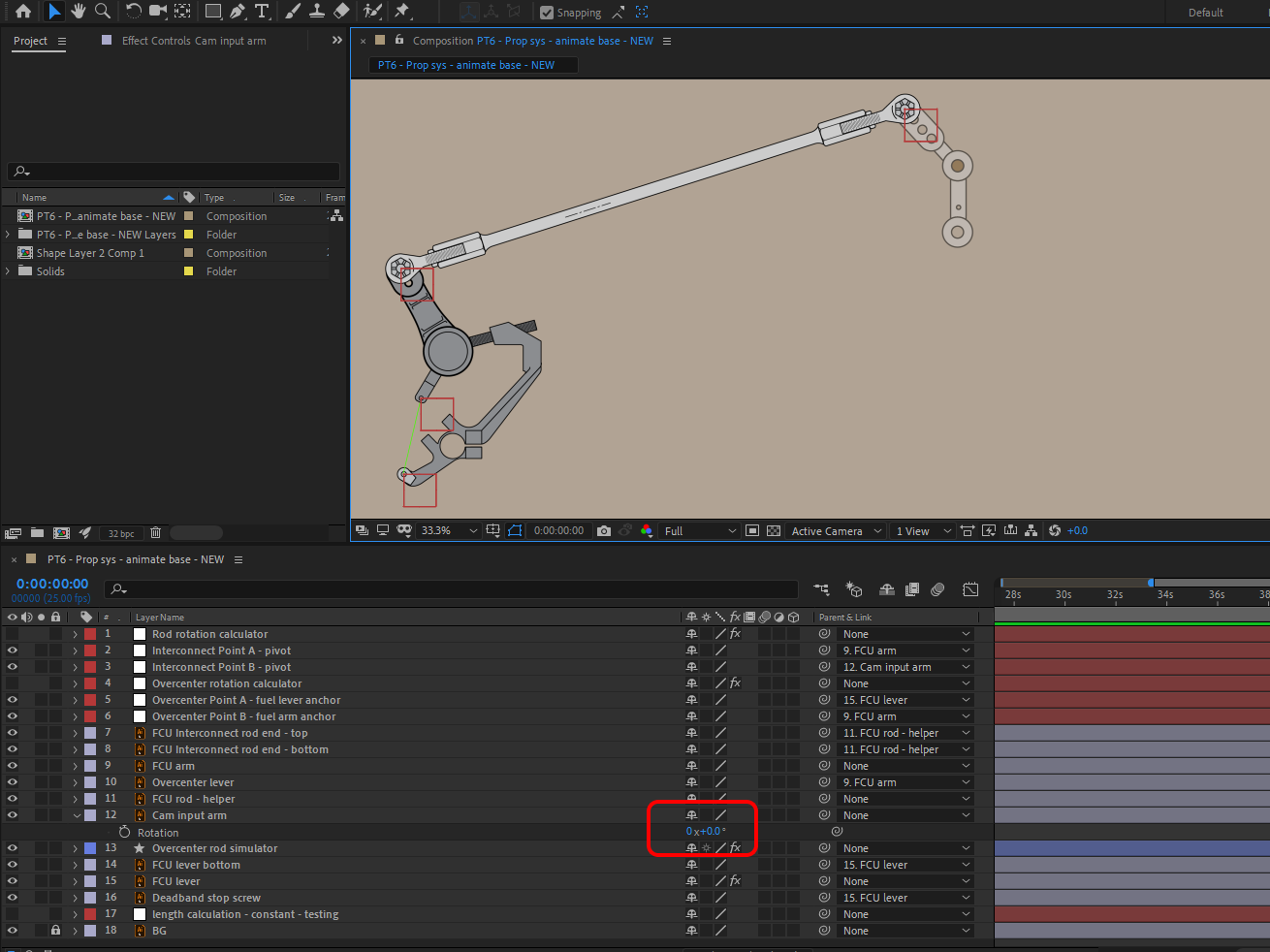
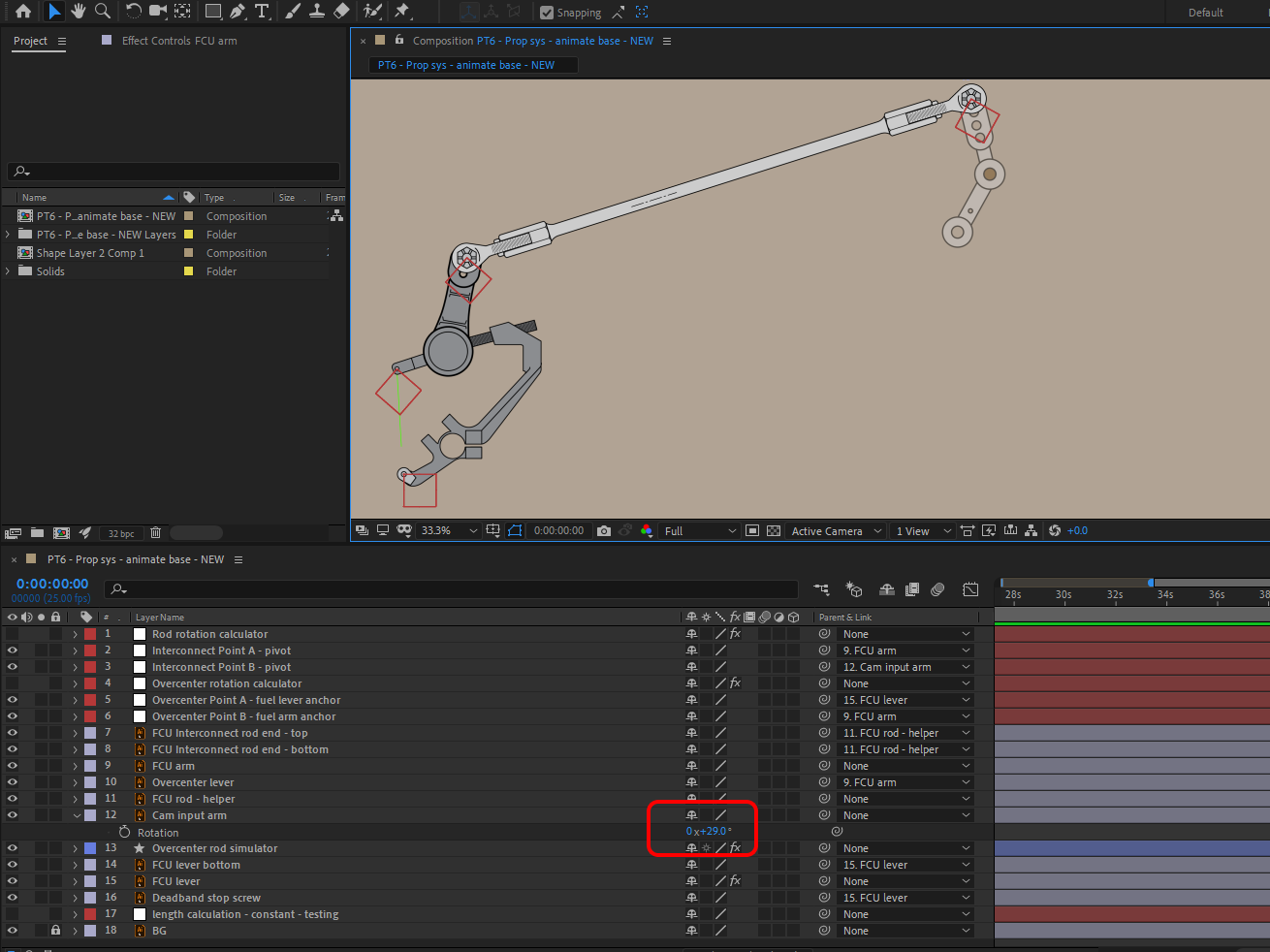
Apologies for bringing back such an old thread, but I wanted to give this another attempt – I never did get that second lever working properly. The second lever only rotates after approximately +29 degrees of input from the main input arm.
In following images, the green path is the “rod”.
0 degrees:
29 degrees
45 degrees
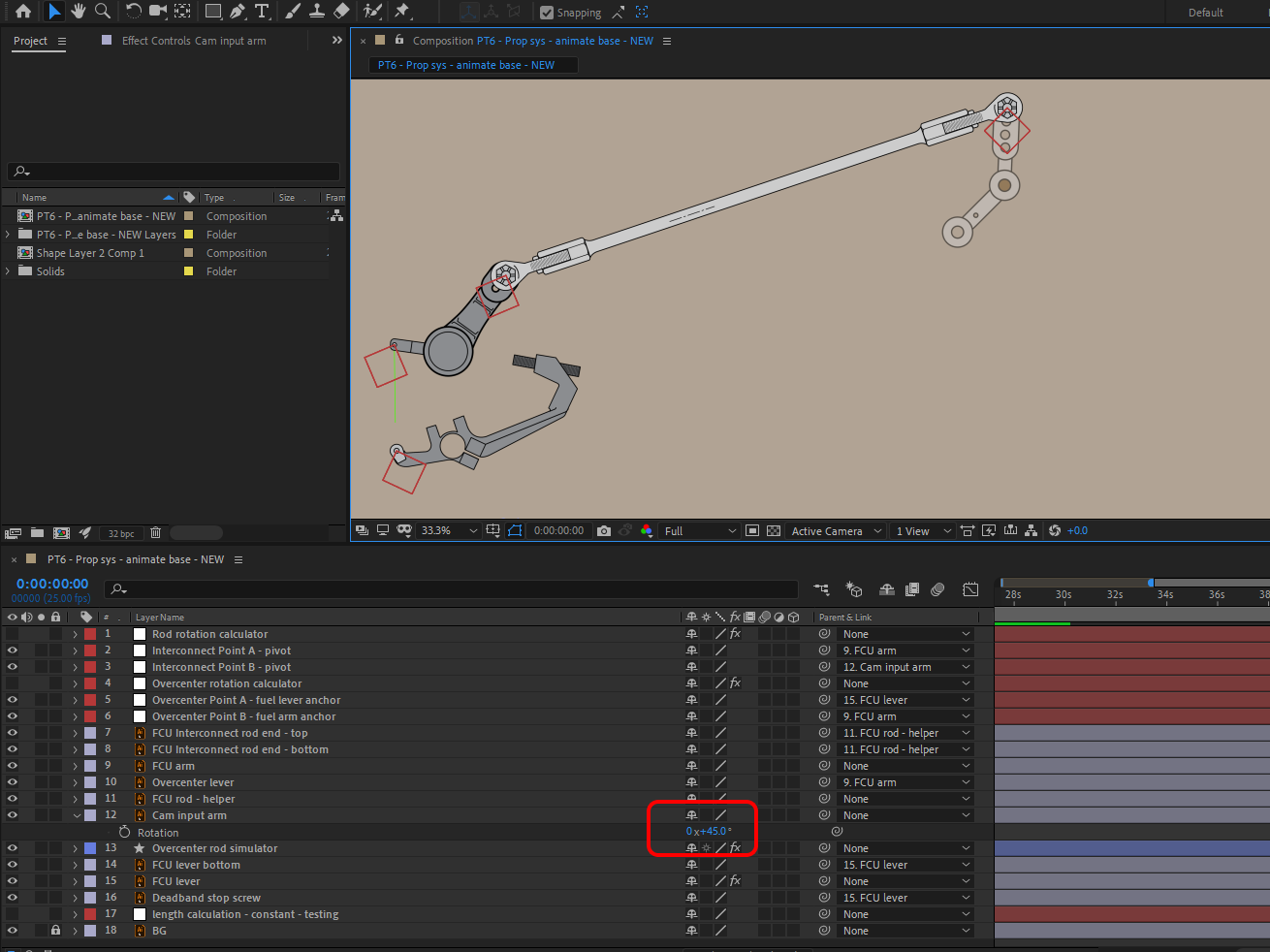
What do you think is the cause of the gap between 0 and 29 degrees?
Appreciate any help, thank you!Below are the project files in CC 2019:
https://curious.ninja/wp-content/uploads/misc/CC2019Overcenter-interconnect-lever.zipI can add the CC 2018 version if needed..
//computes the difference between (target) Rod's length and a length you get when dependent Arm's rotation is alpha

var deltaRodLength = function(alpha){

    arm1 = thisComp.layer("FCU lever");

    arm2 = thisComp.layer("FCU arm");

    rod = thisComp.layer("Overcenter rod simulator");

    //point at which Rod is attached to Arm 1

    null1Pos = arm1.toWorld(thisComp.layer("Overcenter Point A - fuel lever anchor").position);

    //point at which Rod is attached to Arm 2

    null2Pos = arm2.toWorld(thisComp.layer("Overcenter Point B - fuel arm anchor").position);

    //Arm 1 radius

    R1 = length(thisComp.layer("FCU lever").position, null1Pos);

    //Rod length

    targetRodLength = 240.81;

    currentRodLength = length([R1*Math.cos(alpha), -R1*Math.sin(alpha)]+arm1.position, null2Pos);
return currentRodLength - targetRodLength;
}a = 0
b = Math.PI;
err = 0.001//iteration algo
i=0
while (Math.abs(deltaRodLength((a+b)/2)) >=err){
if (deltaRodLength((a+b)/2) > 0){b = (a+b)/2;}
if (deltaRodLength((a+b)/2) < 0){a = (a+b)/2;}
if (deltaRodLength((a+b)/2) == 0){
a = (a+b)/2;
b = (a+b)/2;
}//this prevents AE from freezing when no solution exists
i++;
if (i>100) {break;};
}-radiansToDegrees((a+b)/2)+180;
-
George Umanov
February 11, 2019 at 11:17 pm in reply to: Mechanical cam slot rotation – calculating pointOnPath distance to null point?Well.. that’s pretty impressive.
Thank you for the quick solution!This trick will come in handy for rotating several other parts of the mechanism as well ☺
Let me know if you get anywhere with the pointOnPath method – although this seems to work nicely, so don’t waste too much time.
-
George Umanov
February 11, 2019 at 3:06 am in reply to: Mechanical cam slot rotation – calculating pointOnPath distance to null point? -
Oleg,
Thank you much for the help! I got that interconnect working with your expressions and suggestions.
I decided to use the constant rod length.I am using your same method to rotate another 3rd lever, attached to the FCU arm. Still needs some tweaking, but I’m very close!
AE Files:
https://curious.ninja/wp-content/uploads/misc/Overcenter-interconnect.zipIf you rotate the green “cam input lever” you can see how it works so far.
Seems to rotate the 3rd lever only after 30 degrees on the green arm. -
Although I haven’t been able to modify your expression to work correctly in my composition (yet), I’m really impressed with how quickly you came up with that! Thank you!
I modified it to try to make it work with my layer names and dimensions, but I can’t figure it out.
Here’s what I have so far:
Arm 1 = “FCU arm”
Arm 2 = “Cam input arm”Rod attaches to FCU arm (arm1) at Null 1 (“Interconnect Point A – pivot”)
Road attaches to Cam input arm (arm2) at Null 2 (“Interconnect Point B – pivot”)Parenting:
Null 1 parent is FCU arm
Null 2 parent is Cam input armRod position expression:
B = thisComp.layer(“Interconnect Point B – pivot”);
B.toWorld(B.anchorPoint);Null 3 (“Rod Point C”) is parented to the rod (where it attaches to FCU arm (arm1).
Used to calculate rod length.Photo below:

Link to AE file below, if you want to have a closer look
https://curious.ninja/wp-content/uploads/misc/FCU_Interconnect_folder.zipAppreciate any further help,
Thank you//computes the difference between (target) Rod's length and a length you get when dependent Arm's rotation is alpha
var deltaRodLength = function(alpha){
arm1 = thisComp.layer("FCU arm");
arm2 = thisComp.layer("Cam input arm");
rod = thisComp.layer("FCU Interconnect rod");
//point at which Rod is attached to Arm 1
null1Pos = arm1.toWorld(thisComp.layer("Interconnect Point A - pivot").position);
//point at which Rod is attached to Arm 2
null2Pos = arm2.toWorld(thisComp.layer("Interconnect Point B - pivot").position);
//point at which Rod is attached to Arm 1, parented to rod
null3Pos = rod.toWorld(thisComp.layer("Rod Point C").position);
//Arm 1 radius
R1 = length(thisComp.layer("FCU arm").position, null1Pos);//Rod length
targetRodLength = length(null3Pos, null2Pos);
currentRodLength = length([R1*Math.cos(alpha), -R1*Math.sin(alpha)]+arm1.position, null2Pos);return currentRodLength - targetRodLength;
}a = 0
b = Math.PI;
err = 0.001//iteration algo
i=0
while (Math.abs(deltaRodLength((a+b)/ 2)) >=err){
if (deltaRodLength((a+b)/ 2) > 0){b = (a+b)/ 2;}
if (deltaRodLength((a+b)/ 2) < 0){a = (a+b)/ 2;}
if (deltaRodLength((a+b)/ 2) == 0){
a = (a+b)/ 2;
b = (a+b)/ 2;
}//this prevents AE from freezing when no solution exists
i++;
if (i>200) {break;};
}-radiansToDegrees((a+b)/ 2)+119.8;
-
George Umanov
May 6, 2018 at 6:57 am in reply to: Parented layer spaces – expression formulas for an offset pistonSo it turns out the expression was good, but my process of parenting and adding expressions was incorrect. Everything had to be in the “starting position” before any parenting or expressions being added.
For example: I had to place all parts on a straight line initially, as if the piston and crank rod were all in-line with the center of the wheel. The expression itself handled the offset of the piston. So once the expression was applied, the piston moved to its correct offset position and animated correctly.
Thanks for all the responses 🙂
-
George Umanov
April 14, 2018 at 2:38 pm in reply to: Parented layer spaces – expression formulas for an offset pistonI just figured it would be more accurate to calculate it rather than try to figure out the pixel distance myself, but I suppose I could just throw in a null at the anchors and subtract the y-values myself. I’ll see where that gets me.
Does each piece need to be in a specific position when I apply the parenting and the expressions? I’m assuming everything need to be position to a “starting point”?
So wheel at 0 deg, anchor center. Crank rod at specific angle toward the piston, anchored on outside of wheel. And piston at its offset position with 0 displacement, anchored where it meets the crank rod.
This is where I would apply the parenting, followed by the expressions?All my attempts result in a ridiculous “wobble” of the piston, caused by a crank rod end that draws a circle not a line.
