Forum Replies Created

  • Gary Thomas

    August 26, 2023 at 5:04 am in reply to: Weird Magenta and Green Bars on my Video

    Thank you very much for your help Aivis.

    I tried masking out the static areas while using an offset track to cancel out the banding. It had potential but it would really be a lot of work for a two hour video, having to constantly adjust the mask so no one enters in to it while also maximizing the static area.

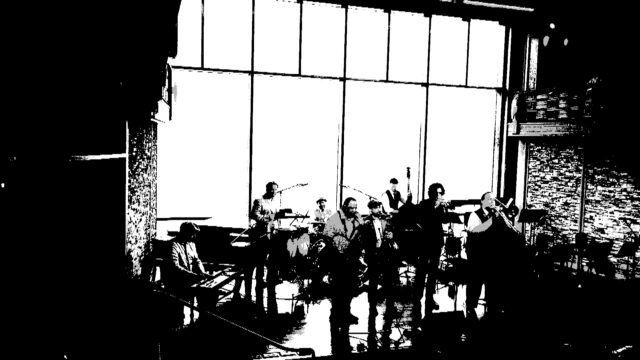
    The banding seems to be most noticeable on the light sections of the video, such as white shirts. I would like to create a mask using a duplicate video and make it high contrast so just the light areas pass through it. That way I can use one or more instances of the secondary color corrector to reduce the banding colors but it would not affect the darker portions of the video. My problem now is I don’t know how to do it. I googled it but all the tutorials only talked about using a pen or rectangle tool etc, to make the mask. How can I make something like this into a mask?

  • Gary Thomas

    August 23, 2023 at 10:16 pm in reply to: Weird Magenta and Green Bars on my Video

    Here’s an update. I tried secondary color corrector and did not have much luck. I tried to reduce magenta since it is most noticeable but that only increased the green, since it is the opposite of magenta. That’s one of the problems here. To reduce one you have to increase the other. Perhaps if I were an expert I might have different results but I gave up after several hours.

    Then I tried a demo of RevisionFX Deflicker. It allowed me to zero in on the bands but I never got a satisfactory result. Also, I can’t pay $250 for a plugin. Which led me to Digital Anarchy Flicker Free. Both of these apps have a rolling band function but Flicker Free was not able to help. The bands are so subtle when compared to the rest of the data in the video that I think it’s hard for software to identify it.

    I tried creating horizontal bars of alternating green and magenta and syncing them with the rolling bands but I almost lost my mind and gave up on that idea.

    I am currently trying something a little different. I have two tracks of the same video and set the upper one to 50% opacity. Then I advance the upper one forward until the magenta cancels out the green and vice versa. Of course everything is ghosting(?) now that the videos are twelve frames out of sync. This method reduces the flicker on stationary objects though so I thought I could Mask out the parts of the video with movement and at least the walls won’t have as much banding. At this point it’s better than nothing. Here’s a sample:

    https://youtu.be/Nn16NYXQo8g

    If anyone has other ideas I’m down to try it. Thanks for your help.

    Some contents or functionalities here are not available due to your cookie preferences!

    This happens because the functionality/content marked as “Google Youtube” uses cookies that you choosed to keep disabled. In order to view this content or use this functionality, please enable cookies: click here to open your cookie preferences.

  • Gary Thomas

    August 17, 2023 at 12:10 am in reply to: Weird Magenta and Green Bars on my Video

    Thank you @aiviszons. Those are really good suggestions. I will give them a try, starting with the secondary color correction.

  • Gary Thomas

    August 15, 2023 at 10:29 pm in reply to: Weird Magenta and Green Bars on my Video

    Thanks for your reply Hector. If you look at the piano player’s shirt and the stone wall to his left you can see the bars. I double checked that they are visible in various video players and other devices and they are. They are kind of subtle, but annoying. They are visible in Vegas also but I didn’t think it necessary to show that. I did a test render and they were still there. I will use Vegas to correct it, if I can figure out how to. Also, it’s highly possible I’m not describing them with the correct terms. Check the piano players shirt though. That’s where it is most noticeable. I had another camera on the other side of the room and it did not have the problem.

We use anonymous cookies to give you the best experience we can.
Our Privacy policy | GDPR Policy