Forum Replies Created

  • I found a solution: Update everything to 23.6. It seems there was some incompatibility before, as described here.

    https://community.adobe.com/t5/premiere-pro-discussions/dynamic-link-picture-cut/td-p/14003891

  • Thank you, this is my next step, uninstalling everything and re-installing.

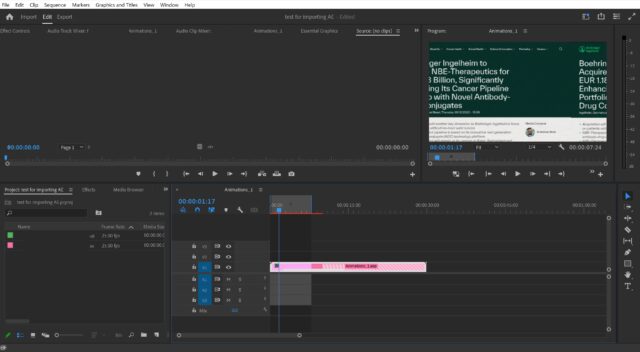
    This is what it looks like in the GUI. In the program monitor, a part from the left side is cut off and inserted on the right, shifting the composition to the left.

    Strangely, this only occurs with After Effects compositions. Otherwise, Premiere works normally. So it is probably not a graphics driver issue, or not even a Dynamic Link isse, more a problem in the interpretation of imported compositions.

  • Frank Baumann

    March 2, 2018 at 5:00 am in reply to: NVIDIA GPU for Premiere Pro CC 2018

    Do you have experience with the Magic Bullet suite on this GPU?

  • Frank Baumann

    February 23, 2018 at 7:53 am in reply to: Premiere Pro CC 2015 10.4 update installer

    Anyone?

  • Frank Baumann

    February 21, 2018 at 6:35 pm in reply to: NVIDIA GPU for Premiere Pro CC 2018

    Many thanks, Tim!

  • Frank Baumann

    February 21, 2018 at 8:52 am in reply to: Proxy workflow in Premiere Pro CC 2015 pre 10.3

    Thanks, I thought so.

    However, my only option at the moment would be 10.3 or 10.4, which both are unavailable. Later versions don’t support my graphics card, and I don’t want to upgrade my entire hardware.

  • Frank Baumann

    January 24, 2018 at 6:42 pm in reply to: Documentary film audio mix

    Thank you, Richard.

    I’ve noticed this on two occasions and doubt it was a mixing accident. The latest was “Banking on Bitcoin”, a Gravitas Ventures film. All the music was hard pan right, while dialogue, VO and Foley were center. Just curious if anyone noticed something similar.

  • Frank Baumann

    October 23, 2016 at 8:17 pm in reply to: Guide to large projects with Premiere?

    I am currently working on a project with 50 hours of interview footage from 40 interviewees that will become a 45-minute documentary. I made a sequence for each interview that I trim down to about 30 minutes each by removing questions, redundant answers, etc. This allows me to get the main interview footage in a relatively clean form. From these sequences, I mark topics. Then, looking at the topics that interviewees discussed, I am grouping them in new sequences containing the same topics from different interviews. These will eventually become “chapters” in the film.

    What I’m currently up against is compiling all the different chapters with B-roll into the final movie. I am doing this by nesting the individual topic sequences in a master sequence where I add B-roll, chapter titles and nameplates. How are others going about this process?

We use anonymous cookies to give you the best experience we can.
Our Privacy policy | GDPR Policy