


Dan Wilson
Forum Replies Created
-

Thanks for the help. but unlike your cause for the fuzziness, i have both project and render as 1920×1080. maybe it’s an upscale problem as i sometimes have to use 720p raw files. and i just updated my sony vegas to 10e. i over looked it due to the vegas 11 downloads.
but the time it takes is still a big issue. about the only thing i add to video is some cropping to get rid of black bars, and a a static text that last through the whole video. would that really cause the long render time?
I read through the link, and it’s pretty insightful. I already use handbreak for short clips that i dont need to add any watermarks to. and it works wonders. now following through with the avid codec part, im am strangely missing the quicktime render option to even be able to use it. was it removed in 10e? and if so, how can i downgrade my sony vegas. would i have to uninstall/reinstall?
again thanks for the help. hopefully i can get the render time down if i can get this to work.
-
no, it stays constant, but then just ends out of nowhere. but i have upgraded to the latest vegas pro 11. and dont have problems with wmv rendering except it just dont look as good as original quality.
any idea where i can find some rendering tutorials to speed up render time and increase compression. cus im waiting like 5hrs for 15 min of video. i dont mind waiting an hr or 2 but 5 seems a bit extreme.
-
first off, my cousin gave me his copy of vegas cus he is able to buy pro 11. so he just sent me his since it took forever to save up for my copy of platinum and i didn’t think i could get 10.0e by only having 10.0c. anyway the reason i use wmv container is because i noticed that after render, even if i dont change any color settings, the video is always brighter on all other formats, excluding avi uncompressed, but thats just too much space. wmv on the other hand keeps the video at the same level as far as my eyes can tell, as well as the file size being considerably smaller (probably the Mbps difference though).
here vids/pic for comparison/example of problem. with the pic, you can see the clear difference in color and in the video, you can hear the sound end a second early in the wmv. it seems for every 30 seconds, there is one second of
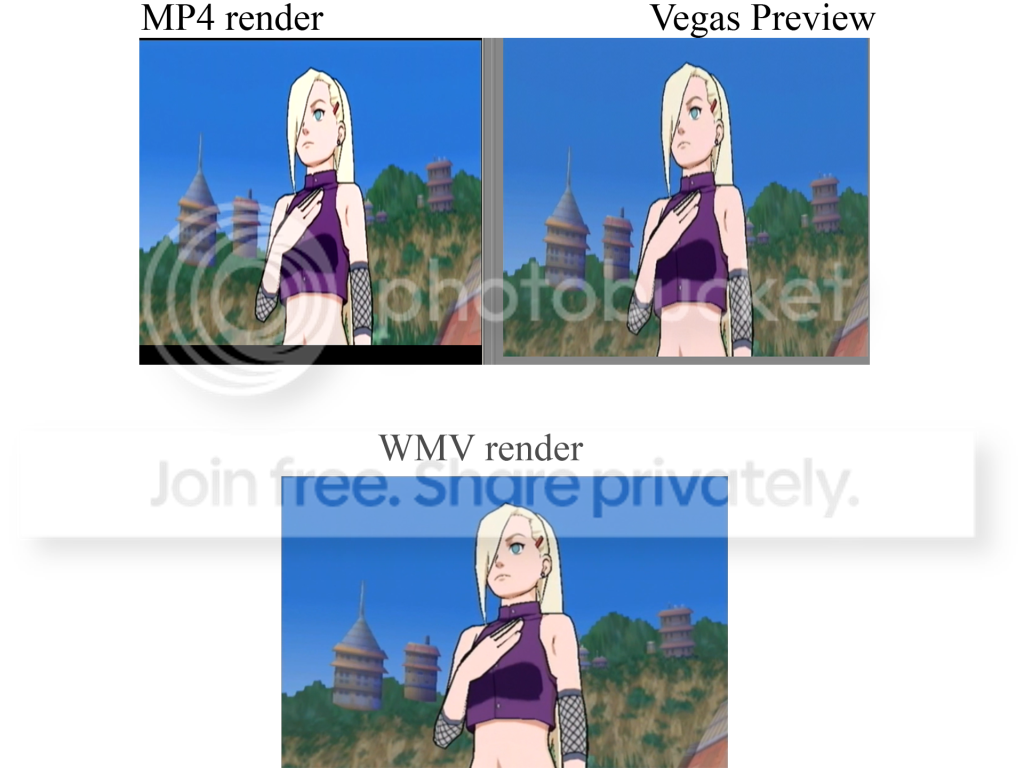
@ Steven. no the audio just stops all together as if i cut it there.
at 0:03 on both, you can see the color difference clearly. at the end the audio stops at 30 sec in on wmv, unlike how it finishes like in the mp4.
Mp4:
https://www.youtube.com/watch?v=HTUodDMoGJcWMV:
https://www.youtube.com/watch?v=sHnxyAWVxz4my render setting are as close as possibe for both containers.
project settings are
1920×1080
Field order: None (progressive scan) ~ Same as original video
pixel aspect ration : 1.0000 (square)
frame rate 29.970 NTSC
Pixel format 8bit
Render quality Best
Motion blur: Gaussian
Deinterlace method: Blend
checked – adjust source media…..MP4 render. (MainConseep AVC/AAC)
Video: 29.970 fps, 1920×1080 Upper field first, YUV, 20 Mbps
Pixel Aspect Ratio: 1.000
checked – used deblocking filter
constant bitrate of 20,000,000
Video render quality: Use project settings.Sony AVC
Video: 29.970 fps, 1920×1080 Progressive, YUV, 16 Mbps
Field order: None (progressive scan) ~ Same as original video
pixel aspect ration : 1.0000 (square)
frame rate 29.970 NTSC
bps 16,000,000
encode: automatic (have tried all options, with same results.)WMV
Video: 29.970 fps, 1920×1080 Progressive, 8.4 Mbps
Pixel Aspect Ratio: 1.000
Mode: CBR
format: WMV9
frame rate: 29.970 NTSC
checked – override default compression buffer (seconds) 3
video smoothness: 100
bitrate: internet lan 8M
