Forum Replies Created

  • Daniel Scherl

    May 8, 2022 at 1:25 am in reply to: 1080p60 editing

    Couple of things:

    1) Have you thought of creating proxy files and editing with those? I think you’d have a much easier time. If not, transcoding yeah.

    2) You mentioned FCP 7. Not to be that person, but… you’re also using a very, very old program by today’s standards. I made the switch years ago and now today, FCP X is a truly fantastic editing program that I think would handle your issues a lot better.

    3) Worst case, this might be a very good excuse to buy a new Mac Studio computer which will handle 1080p 60fps like butter.

    Good luck!

  • Daniel Scherl

    December 5, 2021 at 9:19 pm in reply to: iMovie issue (sorry)

    I know you may not want to hear this, but after trying multiple ways to import MiniDV videos, I found that Quicktime (I’m using version 10.5) is actually the best. It respects the aspect ratio, allows you to bring in uncompressed video, and you can start and stop the tape if you want to, for separate files, or you can just import the whole thing and cut it up later.

    You can also use Final Cut Pro X, which will do a nice job.

    But I wouldn’t use iMovie.

    Hook up your camera to the computer. Open QuickTime. Choose File – New Movie Recording. When the recording window opens, click the little drop down arrow next to the record button and make sure your camera are microphone are selected to your camera, and the quality set to maximum. You can play around with Maximum vs High quality. I went with maximum since hard drives are cheap these days. 🙂

    Good luck!

    Daniel

  • Daniel Scherl

    March 23, 2021 at 11:03 pm in reply to: Trouble Importing Mini DV Footage

    Glenn,

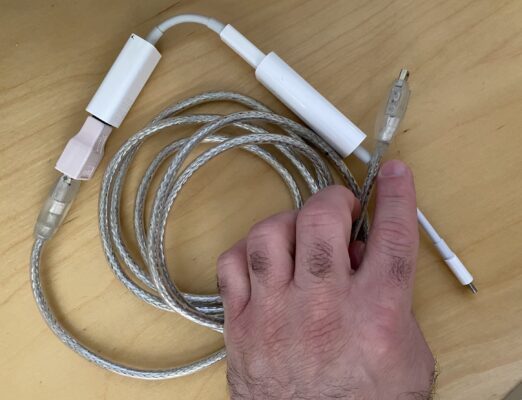
    I had a similar issue with both MiniDV and Hi8 tapes and what I ended up doing was connecting a Firewire 400 cable from the port on the camera to a FW400 to 800 adapter, then a FW800 to Thunderbolt adapter, then Thunderbolt to USB-C adapter, and plugged it in to my MacBook Pro.

    Then, I tested both FCP X and Quicktime X, and I actually got the best results with Quicktime X. I personally didn’t want to go back to FCP 6, and I have to say, the results are great with Quicktime 10.5. I’m on the latest version of the Big Sur OS and have no problems importing my old tapes and QT respects the original codec and aspect ratios as well.

    Hope that helps!

    Daniel

  • Daniel Scherl

    August 3, 2019 at 2:36 am in reply to: Mixed frame rate questions

    Joe, THANK YOU! Worked perfectly and was exactly the kind of solution I was looking for.

    Once I’ve rate conformed the clip, can I make speed adjustments to it? i.e. a drone shot that I want to speed ramp, or do you think it’s better to do the speed ramp first, then do the rate conform? Or is it a simple case of try both and see which one looks better? Haha!

    Thanks very much again!
    Daniel

    Daniel F. Scherl
    President / CEO, Group 8 Productions, LLC
    Los Angeles Boston Cleveland
    (818) 808-0022
    http://www.group8productions.com

  • Daniel Scherl

    December 21, 2010 at 4:47 pm in reply to: Problems with fixing timeline edited in wrong sequence

    Thank to all. We got it fixed and not too much time wasted.

    HAPPY HOLIDAYS!

    Daniel

    Daniel F. Scherl
    President / CEO, Group 8 Productions, LLC
    Los Angeles Boston Cleveland
    (818) 808-0022
    http://www.group8productions.com

We use anonymous cookies to give you the best experience we can.
Our Privacy policy | GDPR Policy