Creative Communities of the World Forums

The peer to peer support community for media production professionals.

Activity Forums Apple Final Cut Pro Legacy Trouble Importing Mini DV Footage

  • Trouble Importing Mini DV Footage

    Posted by Glenn Payne on March 23, 2021 at 10:52 pm

    Hey guys,

    I’m hoping this is the correct forum. I’m trying to import old footage from mini DV tapes I used years ago. I have the camera they were recorded on, which is a Canon HV20. I’m also plugging it into an outlet versus using its battery.

    When I tried a Firewire 4 pin to USB cable on my current iMac the computer wouldn’t recognize the camera. I thought I’d play it safe so I returned that cable, bought a Firewire 4 pin to 6 pin (same kind I used years ago) and tried capturing the footage on my ancient macbook pro, via Final Cut Pro 6 “Log and Capture”. This is the exact method I used to use to copy footage to a hard drive. Still the laptop wouldn’t even recognize the camera. The camera functions fine on its own. I can play the tapes and see/hear them as expected from the cameras display.

    A friend suggested that maybe an OS X update I did on my macbook pro at some point is the problem or possibly a “driver.” Have you guys dealt with this. The camera, program, cable, tapes and laptop are all the same (with the cable being a replacement) equipment that I used years ago to capture tons of footage. That old macbook pro is running OS X 10.6.8 and Final Cut on it is 6.0.6. I don’t edit with it, just have the old version still on there. My current iMac is 10.15.7 with FCPX 10.5.1.

    Thanks for any advice!

    Glenn Payne replied 5 years, 1 month ago 6 Members · 8 Replies
  • 8 Replies
  • Daniel Scherl

    March 23, 2021 at 11:03 pm

    Glenn,

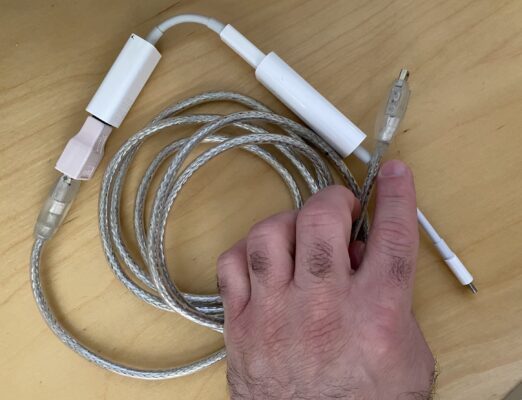
    I had a similar issue with both MiniDV and Hi8 tapes and what I ended up doing was connecting a Firewire 400 cable from the port on the camera to a FW400 to 800 adapter, then a FW800 to Thunderbolt adapter, then Thunderbolt to USB-C adapter, and plugged it in to my MacBook Pro.

    Then, I tested both FCP X and Quicktime X, and I actually got the best results with Quicktime X. I personally didn’t want to go back to FCP 6, and I have to say, the results are great with Quicktime 10.5. I’m on the latest version of the Big Sur OS and have no problems importing my old tapes and QT respects the original codec and aspect ratios as well.

    Hope that helps!

    Daniel

  • Steven J. gilbert

    March 23, 2021 at 11:03 pm

    Had a similar issue. Try this cable

    Tripp Lite FireWire 800 IEEE… https://www.amazon.com/dp/B000AAZQM2?ref=ppx_pop_mob_ap_share

    Then use this adapter

    Apple Thunderbolt to FireWire Adapter https://www.amazon.com/dp/B00SQ2CJUS/ref=cm_sw_r_cp_api_glt_fabc_YPE9T16NMW179W0ZBQZZ

    I have an older MacBook Pro with Thunderbolt 2. I used it with a DSR-11 and FCPX. Hope this helps.

  • Bret Hampton

    March 23, 2021 at 11:12 pm

    Glenn

    I’ve heard Apple is no longer supporting Firewire on newest OS updates. I would try Daniels idea. If that doesn’t work check if any of your friends has old OS and try that.

    If no luck you can buy an analog to USB convertor to capture footage. Most cameras have analog as well as Firewire outputs.

  • Glenn Payne

    March 23, 2021 at 11:46 pm

    Thanks so much, everyone! I’ll try the cable workarounds and see if that gets it done. Much appreciated! 🙂

  • Karl Richter

    March 24, 2021 at 4:53 pm

    Hey Glenn.

    I used DV for a commercial in Autumn 2020 where I was cross-cutting media (iPhone, RED, DV) and the trick to importing your DV footage is to use iMovie with the correct cable.

    iMovie recognized the camera instantly and I was able to log and capture easily that way.

    I did the same thing in the fall of 2019 for a short film, using DV.

    In 2020 I believe I was on MacOS Catalina 10.14… I think. I might have been on 10.15 at that point.

  • Glenn Payne

    March 24, 2021 at 4:55 pm

    Thanks so much, Karl! I’ll give that a shot.

  • Eric f. Scholl

    March 24, 2021 at 5:05 pm

    Quick reply (will try to offer more suggestions later): if you have iMovie, have you tried importing from that app?

  • Glenn Payne

    March 24, 2021 at 11:02 pm

    Hey Eric,

    A couple others mentioned iMovie. I don’t have it at present, but I can snag it and see if it works. Thanks!

We use anonymous cookies to give you the best experience we can.
Our Privacy policy | GDPR Policy