Forum Replies Created

  • Yep, you are spot on, Ben.
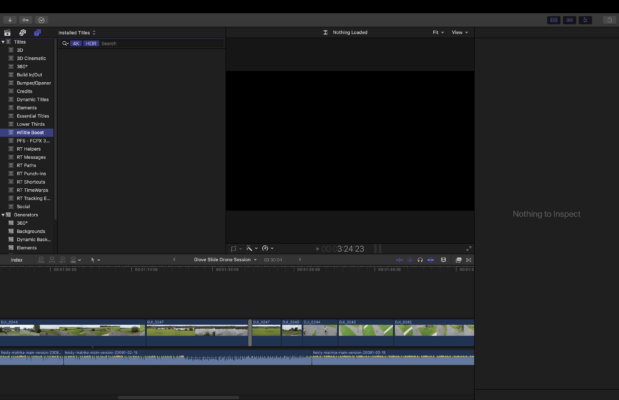
    It was the search field.
    The 4K and HDR search was the cause.
    I had contacted apple today, and it took us almost 10 min. to find the problem, but indeed it was the search field.
    Thanks so much for helping me as well, Ben!
    Have a great day!

  • Thanks Ben,
    I cannot select any plugin titles in the browser.
    Therefore using E or Q to apply them won’t work

    When clicking the plugin titles in the titles browser, the Installed Titles section remains empty.
    The titles do not show.
    FCP does no say they are missing either when clicking them.

  • O.K.
    I was just saying what FCP was telling me.
    Let me put it that way.
    I cannot use all of my plugins living in the titles file anymore.

    No matter what brand the plugins are from.

    The plugins are still there, and they are still in the titles browser, but when I click them in order to apply them, they do not show.
    Even though they are all in the titles folder.

    So, even though the plugins are still there, Final Cut won’t apply them anymore when I click them.

  • Thanks for your answer, Ben.
    I cannot apply them anymore.
    If I click them, nothing happens.
    I do not get to see the plugins.
    That’s what I mean when saying open.
    I just say ”open”, because this is what Final Cut is saying, when I click the plugin in the finder/movies folder.

  • Thanks for your reply:
    I’ve bought plugins from Ripple Training, Motion VFX and Pixel Film Studios.
    Then I installed them.

    All of them were working just fine for many months.

    From one day to another, all plugins in the FCP titles won’t open when I click them.
    So I cannot apply them to a project timeline anymore.

    The plugins still show up in the title browser, but when I click them nothing is displayed and nothing happens anymore

    I am not talking about templates, but plugins like mTitle Boost (Typography Layouts) or
    FCPX 3D Indicators.

    When adding an adjustment layer that lives in custom titles,
    I cannot open it either.
    Even though it’s in the finder and movies folder.

    Final cut says:
    The document could not be opened.

    Final Cut cannot open files in the ‘Motion Title’ format.

    Titles are stored in Movies Folder – Motion Templates Folder – Titles
    All other plugins in the Motion Templates Folder still open and can be applied to the timeline when using Final Cut Pro.
    Only the plugins in the title folder are affected.

    Thanks
    Dan

  • Yep, motion is installed.

We use anonymous cookies to give you the best experience we can.
Our Privacy policy | GDPR Policy