Forum Replies Created

  • Dan Doak

    January 15, 2022 at 2:47 am in reply to: Vegas Pro 19 very low font size and controls

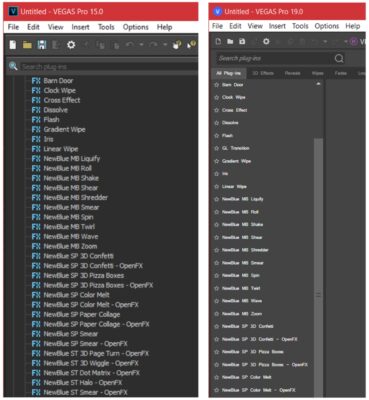
    I’ve struggled with the same small font size issue in Vegas Pro 19.0. When comparing version 15.0 to 19.0, the font size is definitely smaller in certain areas.

    I’m using a 4K monitor scaled to 150%. In Windows 10, I’ve tried changing Font Size, but in Vegas the font size does not change in Transitions, Video FX, Media Generator, etc.

    Wish I would not have upgraded. Seems I get more frustrated with each release of Vegas.

    Does anyone have another idea or work-around on how to increase the font size in Vegas 19.0?

    Here’s a comparison between 15.0 and 19.0.

  • Dan Doak

    April 17, 2012 at 1:24 am in reply to: no GPU acceleration with GTX-570 in SVP 11

    Thank you…
    I’ll update the driver and see if there is an impact. I have kept some benchmark counts, so I’ll have an idea of this helps.

    I believe Sony originally mentioned earlier GPU driver versions, but perhaps this has change from SVP 11.0 build 425. I’m running the latest build 595.

    Again, appreciate the feedback.

  • Dan Doak

    April 17, 2012 at 12:48 am in reply to: no GPU acceleration with GTX-570 in SVP 11

    I upgraded to SVP 11.0 just because of the GPU acceleration. Unfortunately it does not work!

    Using a NVIDIA GTX-470 and I do not notice any difference (preview or reneder) when comparing to previous SVP 9.0.

    I’ve tried playing with many of the setting that others have mentioned, all to no avail. I’m gonna update GPU drivers to see if this helps. Will provide feedback if this solves this issue.

    Core i7 860 @ 2.8GHz
    16GB Memory
    Windows 7 64-bit
    GeForce GTX 470 Driver Version 270.61

    Perhaps Sony this release was not ready for prime-time.

We use anonymous cookies to give you the best experience we can.
Our Privacy policy | GDPR Policy