Brian Deviteri
Forum Replies Created
-

Brian Deviteri
February 16, 2021 at 1:32 pm in reply to: New Mac Pro Problem with H 265 Codec / Footage from EOS R5No need for external hardware and it can be done via software.
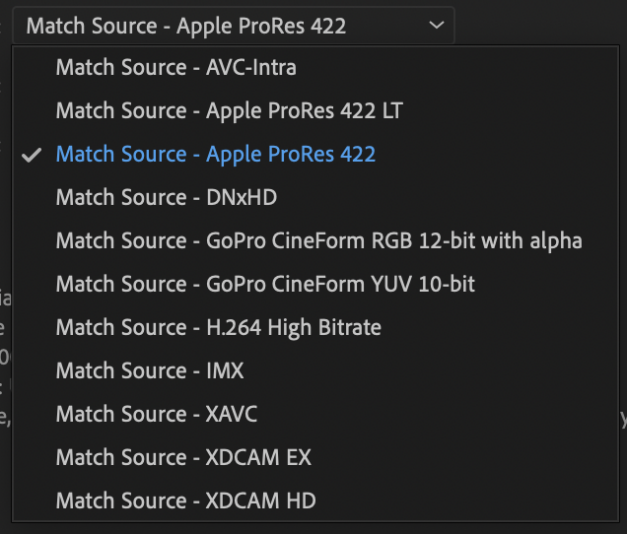
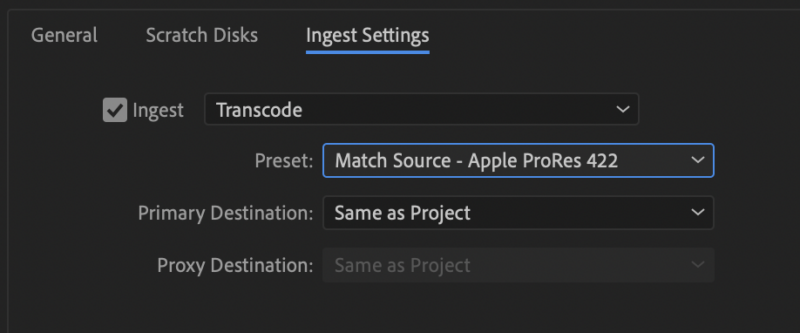
You can transcode on ingest through the ingest settings under the new project panel, or under file > project settings > ingest settings for an existing project.
Just make sure to pick the TRANSCODE option under the pulldown.
COPY will not do anything to help.
CREATE PROXIES will not really solve your issue longterm, but will help with short term editing. Just have to relink original sources before export. The proxy files themselves are not full resolution and usually at a 1:2-1:6 ratio. Most of the “medium” varieties are 720HD resolution, which could be helpful for your workflow, but that’s a whole different topic.

-
Just to add to this, if you’re working with multiple applications accessing the same media pool, this is even more important, especially if you’re going to use FCP and AE.
Find a structure and organizational method that WORKS for you, makes sense, and is repeatable.
Also need to plan out your workflow. If you work on multiple small projects vs. just one or two large projects at a time, it can change your organizational structure a little bit. If you work on episodic stuff that reuses the same footage frequently it can slightly alter your approach as well.
-
The TIFF sequence successfully rendered without an issue. So at least there’s a workaround.
Video CoPilot support suggested I disable GPU rendering, which I already had done.
They also had me download a new build of the Optical Flares plugin (build 1.3.140) that failed when “Render Multiple Frames Simultaneously” was selected, rendering to an Apple Animation.
However, when disabling “Render Multiple Frames Simultaneously” it seems to be chugging through the sequence without an issue… it’s past numerous points that it had failed at previously. Unfortunately, the render is almost twice as long with the option disabled (and live preview disabled as well).
-
Brian Deviteri
June 8, 2011 at 4:56 pm in reply to: re: KONA LHI Outputting to Beta from NTSC Apple Pro Res SequenceCheck your black burst synch generator. Also check your AJA control panel to make sure it’s outputting 525, not an HD format.
Have you tried AJA TV to just see if the BetaSP deck can get a video signal in? Have another SD source (or HD deck with downconvert) to just check to see if the deck doesn’t have an issue accepting a signal? I have one BetaSP deck that has now become a player only instead of a player/recorder.
I have a Kona 3/3G so my process to go out to BetaSP is a bit different – SDI/AES out and the BetaSP has an SDI to Component converter and a Component to SDI converter (both AJA boxes). Audio is through a Flying Cow AES to analog converter. If you have converters like that handy, it may be worth a shot too.
-
Are you using your system’s drive for your media and scratch disks, or are they housed on an external hard drive?
What type of desktop machines are you experiencing this issue in?
Depending on the type of work you’re doing, a MacBook Pro just might not be cutting it, especially if you are running other apps in the background, or at the same time. This includes those “hidden” apps that are running as well.
-
Look at CalDigit HDPro’s. I use them on my MacPros and love them. Reliable, RAID-5, and great performance. You will notice increased performance almost immediately.
-
ProRes 422 is a great format to use. I’d recommend it if it fits into your workflow. Some people have experienced issues with Gamma levels between AE and FCP, but they appear to have been worked out.
If you need an alpha channel, then I’d still recommend Animation. I find the results to be better than other options I’ve tried. Even though you need to “render” that portion of your timeline in FCP, I think the tradeoff is worth it.
-
Walter – Doubt this is related to the thread I posted awhile back about the smaller Animation files from CS5.5 vs CS4, but I am also experiencing this same issue.
Support emails have been sent to Video CoPilot and Adobe, so we’ll see what they say, if anything.
It does appear that the TIFF sequence render option is a successful workaround, so far. Unfortunate for those of us that need to deliver .MOV files (with audio) as it adds an extra step to assemble, but that’s much better than having to babysit and restart renders several times, especially for those renders that are being left overnight.
-
Add another person to the growing list…
Mac OSX 10.6.7
2 x 2.93GHz 6-core Intel Xeon
64GB 1333 MHz DDR3
After Effects CS5.5 (10.5.0.253)As some others have similarly noted, I also have Video CoPilot Optical Flares effects installed.
I have updated to the newest version from this page:
https://www.videocopilot.net/support/updates/It is listed (text-wise) as Optical Flares Version 1.2.134 For Mac 64-bit, however the download is opticalflares_mac_x64_1.3.134.zip, so I’m not sure if this is really version 1.2.134 or version 1.3.134. Either way, it is the newest one they are offering, last updated in January 2011.
Support email to Video CoPilot has been sent – not sure if they are aware of any issues, but it can’t hurt to find out…
I am attempting to render to Apple Animation without Alpha – have done this numerous times last week using the same output modules without any issues, however those sequences probably were not using Optical Flares plugin.
I have deleted and manually rebuilt all output modules.
I have deleted the system cache and rebuilt it.
I have turned multiprocessing on and off.
I have adjusted the amount of RAM and CPUs being used.
…and the issue is still happening when attempting to go to Apple Animation.worth noting, I did observe a difference in the CS5.5 Apple Animation files in this thread: https://forums.creativecow.net/thread/2/1000716
This current sequence I am rendering is 1920×1080, 29.97 (using a standard sequence preset) and about 4 minutes long.
I can successfully restart the render several frames prior to the failure (to reassemble later) and it will render successfully beyond the failure point, but I will get another failure message later on. I can repeat this “start again” method as a work-around, but this requires babysitting the renders.
(EDIT: changed this newest render to a TIFF sequence and the render times are much closer to the Animation piecemeal render. 55 minutes left to find out if it fails…)
-
Brian Deviteri
May 20, 2011 at 2:22 pm in reply to: Smaller Render Files with CS5.5 (10.5.0.253), upgraded from AE CS4 (9.0.3)Walter – thanks for the help.
Interesting that you do not have any differences at all. I do not have AE CS5 or else I would test there as well. It may be that CS4 and CS5 are equal and that CS5.5 is where the size difference comes into play.
It’s very interesting. I’m not entirely concerned at the moment, unless I run into a problem down the line.