Forum Replies Created

Page 6 of 65
  • I think this may help

    if (thisProperty.numKeys == 0){
    thisProperty.setValue(0);
    }else{
    thisProperty.setValueAtTime(app.project.activeItem.time,0)
    }
  • Andrei Popa

    August 27, 2022 at 12:51 pm in reply to: Get the character index as the animator sees it.

    This is really impressive.

    May I ask where you got the array with the ligatures from?

  • Andrei Popa

    August 26, 2022 at 8:45 am in reply to: Script for scale animation with custom interpolation.

    Sorry, forgot that scale is a 3D property. Try this

    var myScaleProperty = app.project.activeItem.selectedLayers[0].property("Scale");
    var tStartIn = 0;
    var tStartOut = 1;
    myScaleProperty.setValuesAtTimes([tStartIn, tStartOut], [[0, 0], [100, 100]]);
    var ease1 = new KeyframeEase(0, 50);
    var ease2 = new KeyframeEase(0, 80);
    myScaleProperty.setTemporalEaseAtKey(1, [ease1, ease1, ease1]);
    myScaleProperty.setTemporalEaseAtKey(2, [ease2, ease2, ease2]);
  • Andrei Popa

    August 25, 2022 at 8:19 pm in reply to: Get the character index as the animator sees it.

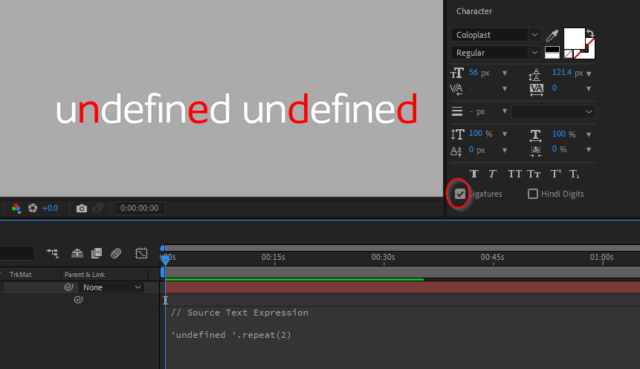
    The problem is that I do not have the ‘unde\uFB01ned ‘.repeat(2) as source text.

    I have the source text <i style=”font-family: inherit; font-size: inherit;”>’undefined ‘.repeat(2). But it looks like this due to ligatures in font.

    I need a way to get the string as it is after the text engine process it. ‘fi’ is not the only ligature in this font. It also has fl, and maybe some more, and they are automatically transformed.


    In this example I used this expressions:

    // Source Text Expression

    'undefined '.repeat(2)

    // Expression Selector Expression

    var str = text.sourceText;

    str.charAt(textIndex-1) == 'n'?100:0;


  • Andrei Popa

    August 25, 2022 at 4:54 pm in reply to: How to move timeline layers with marker?

    If you have all the layers selected, maybe go to the marker time with the timeline cursor and press “[“.

  • Andrei Popa

    August 25, 2022 at 4:51 pm in reply to: Script for scale animation with custom interpolation.

    Maybe something like this:

    var myScaleProperty = app.project.activeItem.selectedLayers[0].property(“Scale”);
    var tStartIn = 0;
    var tStartOut = 1;
    myScaleProperty.setValuesAtTimes([tStartIn, tStartOut], [[0, 0], [100, 100]]);
    var ease1 = new KeyframeEase(0, 50);
    var ease2 = new KeyframeEase(0, 80);
    myScaleProperty.setTemporalEaseAtKey(1, [ease1]);
    myScaleProperty.setTemporalEaseAtKey(2, [ease2]);

  • Andrei Popa

    August 25, 2022 at 4:43 pm in reply to: Get the character index as the animator sees it.

    Hi Fabrice, thanks for your reply.

    This is indeed interesting, but my problem is kinda backwards. I have the “fine” source text. When I check “Ligatures”, it becomes ‘\uFB01ne’. I wonder if I can somehow get that string, the one that is seen after I check ligatures (the 3 chars long one), from “fine”.

    I need this because I want to make some words to change color in arabic languages. In the latest update, Adobe made it so animators correctly count characters (right-to-left, before it counted character left-to-right even if the text layer was RTL). The problem is that arabic has a lot of ligatures, and the Javascript that counts the characters to find the match and the animator that changes the colors count differently. Javascript counts 2 characters per ligature and animator counts one. I get the string via expressions, so I don’t know how to transform it from no ligatures to ligatures, so the Javascript counts characters the same way that the animator does.

    I don’t know arabic so I work with some text I took from a lorem ipsum site. I have isolated some of the exceptions. One of them is this لإ which is seen as 2 characters by text.sourceText.length and as 1 by the animator. I observed the same behavior when dealing with the fi ligature so I figured out it’s the same problem and I am trying to fix the fi one.

    I hope all of this make sense.

  • Something similar to this

    layer("LayerName")("Effects").numProperties

    This works both in expressions and in scripts

  • Andrei Popa

    August 3, 2022 at 1:56 pm in reply to: Layer size and bounding box not in sync

    I am not sure I understand. You are saying that the scale, as value, seen in the timeline changes but the layer in the viewer stays the same? If so, does it have a parent? Maybe the parent size changes so the layer stays visually the same.

  • Andrei Popa

    August 2, 2022 at 9:55 am in reply to: Auto-detect if there’s a keyframe

    Hi Steve.

    I think that for an even easier and shorter code, you can go like this

    if(numKeys == 0){
    //no keys
    }else{
    //some keys
    }

    Using numKeys also gets you the number of keys, so you can use an expression only if you have a certain number of keys.

Page 6 of 65

We use anonymous cookies to give you the best experience we can.
Our Privacy policy | GDPR Policy