Creative Communities of the World Forums

The peer to peer support community for media production professionals.

Activity Forums Adobe After Effects Expressions Get the character index as the animator sees it.

  • Get the character index as the animator sees it.

    Posted by Andrei Popa on August 17, 2022 at 2:00 pm

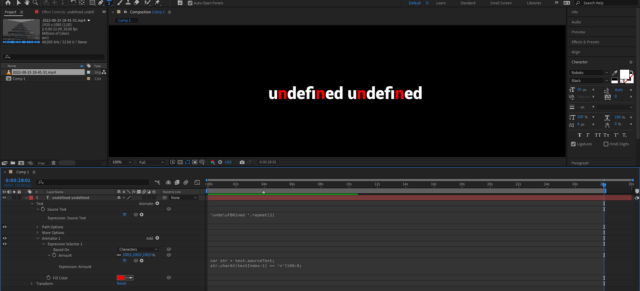
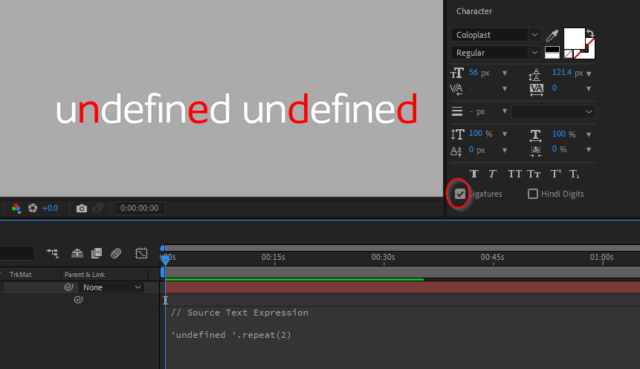
    Hi guys. I am running in a bit of trouble and was wondering if it is fixable in any way. Let’s say I want to highlight the letter “n” in the word “fine” and I have a font that has a ligature character for “fi”.

    I am using a text animator with fill color property.

    According to javascript (using indexOf()), n is the third letter in the word. According to my text animator, it is the second (because the first fi is considered a single letter). And this problem gets worse if I have more ligatures in the text.

    Is there a way to get the index of a character as the text animator counts them? I know that this information is available to After Effects because when changing percentage to index in the text animator selector, the animator gets the correct number of characters (3 if ligatures is enabled, 4 if not).

    I hope I was clear enough, thank you!

    Fabrice Leconte replied 3 years, 8 months ago 2 Members · 9 Replies
  • 9 Replies
  • Fabrice Leconte

    August 25, 2022 at 4:01 pm

    Hello, did you try to play with normalize method?

    str = '\uFB01ne'

    normalized = str.normalize('NFKC')

    str + ' = ' + str.length + ' chars | ' +

    normalized + ' = ' + normalized.length + ' chars'

  • Andrei Popa

    August 25, 2022 at 4:43 pm

    Hi Fabrice, thanks for your reply.

    This is indeed interesting, but my problem is kinda backwards. I have the “fine” source text. When I check “Ligatures”, it becomes ‘\uFB01ne’. I wonder if I can somehow get that string, the one that is seen after I check ligatures (the 3 chars long one), from “fine”.

    I need this because I want to make some words to change color in arabic languages. In the latest update, Adobe made it so animators correctly count characters (right-to-left, before it counted character left-to-right even if the text layer was RTL). The problem is that arabic has a lot of ligatures, and the Javascript that counts the characters to find the match and the animator that changes the colors count differently. Javascript counts 2 characters per ligature and animator counts one. I get the string via expressions, so I don’t know how to transform it from no ligatures to ligatures, so the Javascript counts characters the same way that the animator does.

    I don’t know arabic so I work with some text I took from a lorem ipsum site. I have isolated some of the exceptions. One of them is this لإ which is seen as 2 characters by text.sourceText.length and as 1 by the animator. I observed the same behavior when dealing with the fi ligature so I figured out it’s the same problem and I am trying to fix the fi one.

    I hope all of this make sense.

  • Fabrice Leconte

    August 25, 2022 at 6:01 pm

    I probably missed something but just using this expression I have a good result.

    it doesn’t matter if the ligature box is checked or not.

    // Source Text Expression

    'unde\uFB01ned '.repeat(2)

    // Expression Selector Expression

    var str = text.sourceText;

    str.charAt(textIndex-1) == 'n'?100:0;

  • Andrei Popa

    August 25, 2022 at 8:19 pm

    The problem is that I do not have the ‘unde\uFB01ned ‘.repeat(2) as source text.

    I have the source text <i style=”font-family: inherit; font-size: inherit;”>’undefined ‘.repeat(2). But it looks like this due to ligatures in font.

    I need a way to get the string as it is after the text engine process it. ‘fi’ is not the only ligature in this font. It also has fl, and maybe some more, and they are automatically transformed.


    In this example I used this expressions:

    // Source Text Expression

    'undefined '.repeat(2)

    // Expression Selector Expression

    var str = text.sourceText;

    str.charAt(textIndex-1) == 'n'?100:0;


  • Fabrice Leconte

    August 25, 2022 at 9:10 pm

    Using Roboto font, I have the same result as you.

    But if I change to Arial or some others fonts, it works correctly.

  • Fabrice Leconte

    August 27, 2022 at 3:37 am

    I fixed the problem, I created a function to convert a regular string to ligature string

    Just 1 problem, the expression is about 8700 lines. 😂

    You’ll probably need to remove some useless entries in the array such as asian characters if you don’t need.

    https://imgur.com/a/KfZ3fWH

    View post on imgur.com

  • Fabrice Leconte

    August 27, 2022 at 4:28 am
  • Andrei Popa

    August 27, 2022 at 12:51 pm

    This is really impressive.

    May I ask where you got the array with the ligatures from?

  • Fabrice Leconte

    August 29, 2022 at 4:39 pm

    I extracted ligatures from this list Unicode Data

We use anonymous cookies to give you the best experience we can.
Our Privacy policy | GDPR Policy