Al Jensen
Forum Replies Created
-

Al Jensen
June 22, 2021 at 1:06 am in reply to: Lumetri Crushing Blacks since Premiere CC Pro 2018+, is there a fix?I installed Premiere 2021 (15.2) and blacks are still broken in Lumetri compared to 2017 and earlier. It continues to be totally unusable so far as I can tell.
Following these posts by Neil you can kind of work around it, but it’s still not consistent and requires doing it all from scratch for every single source:
https://community.adobe.com/t5/premiere-pro/lumetri-limitations/m-p/#M59055
If anybody wants to test, here’s the clip I’m using in the example picture, which is from a Lumetri color grading tutorial, so you know it should be fine:
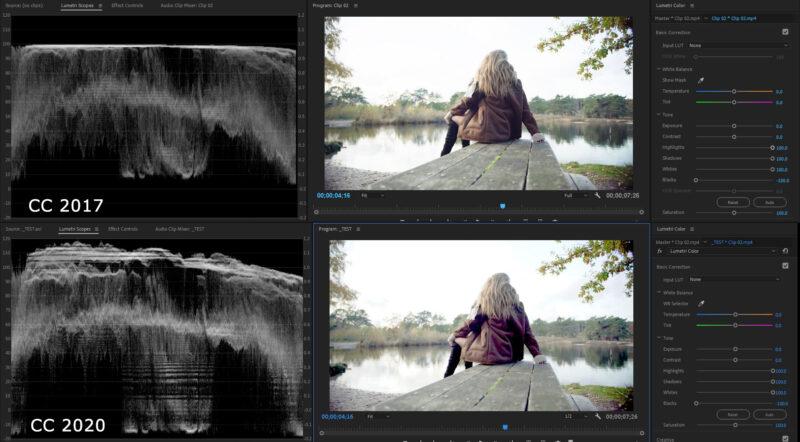
All I’m doing is intentionally exaggerating the differences by setting Highlights, Shadows and Whites to 100 and setting Blacks to -100, but even without exaggerating Premiere 2021 is significantly worse than 2017. (See my original posts for pictures of the Lumetri panel if that helps).
No matter what format, what source, etc, the blacks get crushed and the image gets destroyed (and sometimes turns purple?). I feel like I’m taking crazy pills because color grading via Lumetri is not really possible in its current incarnation and yet other people are doing it every day so I must be missing something. I would happily pay for support to help resolve this issue in an easy to replicate manor if anyone has any suggestions of where I could go to do that.
Thanks!

-
Al Jensen
February 20, 2021 at 1:44 am in reply to: Lumetri Crushing Blacks since Premiere CC Pro 2018+, is there a fix?I played around with Resolve again after originally posting this thread, but we just have so many processes that involve not just Premiere, but other Adobe products, not to mention Premiere-specific assets that don’t need to be recreated all the time, that the time investment required to jump to another product is daunting to say the least.
I might have to take the plunge though. Fingers crossed no Windows or NVIDIA driver update breaks CC 2017 in the meantime while I continue to procrastinate!
-
Al Jensen
February 15, 2021 at 12:19 am in reply to: Lumetri Crushing Blacks since Premiere CC Pro 2018+, is there a fix?Yeah, but it’s not even like it’s just slightly bad, it’s actively destroying the image, and I don’t understand why it hasn’t been fixed in literally years and why nobody talks about.
Look at the image I posted before, which I’m reattaching here. The darker shadow areas of her coat are being totally destroyed by Lumetri in CC 2020, it’s turning into a blocky artifacty purple mess. On the other hand, CC 2017 is perfectly clean.
The CC 2020 version is completely unusable in any professional setting, I wouldn’t let my nephew upload something that looked that bad to YouTube. I cannot for the life of me understand what’s going on here.
-
Al Jensen
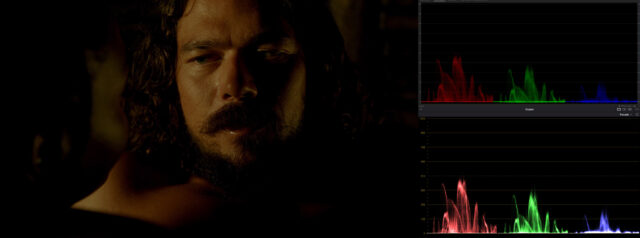
September 26, 2020 at 1:48 am in reply to: Lumetri Crushing Blacks since Premiere CC Pro 2018+, is there a fix?Here’s 2020 vs. Resolve’s RGB Parade with no color correction. Looks pretty much the same to me to be honest, though I have no idea how to replicate the same Lumetri style settings in Resolve to see if it gets split up.
-
Al Jensen
September 25, 2020 at 11:20 pm in reply to: Lumetri Crushing Blacks since Premiere CC Pro 2018+, is there a fix?I’ll have to reinstall Resolve and then maybe I can do some comparisons in how they interpret color data.
In the meantime, I think this Waveform Luma I’m attaching really shows what I’m talking about with how it’s shredding the data into chunks causing a blocky detail-destroying mess when you move the blacks to the left even in a naturally very bright clip. I cranked the shadows, highlights and whites to help demonstrate how it turns into chunks a bit better compared to 2017.
I’m also attaching a close up crop of the results so you can really see how much it’s being totally wrecked, with her jacket turning into blocky purple with all of the detail in the darkest parts crushed out. (Right-click -> View Image to see them at full resolution).
This example is Clip 02 from this Premiere Pro 2020 Lumetri Color Grading series, which I’m happy to upload somewhere if someone wants to make their own tests:
-
Al Jensen
September 25, 2020 at 4:18 pm in reply to: Lumetri Crushing Blacks since Premiere CC Pro 2018+, is there a fix?Maybe I will call them, though I also don’t think it will help since it’s been like this now for multiple versions of Premiere over 3+ years now.
What I don’t understand is how anybody is using it in its current state as it appears to be totally useless. Adjusting black levels is very basic color correction, and the whole point of using the Lumetri Color panel is to be able to make those basic adjustments quickly. Instead we have an entire slider that doesn’t do anything that anyone could realistically ever use At least so far as I can tell.
-
Al Jensen
September 23, 2020 at 8:46 pm in reply to: Lumetri Crushing Blacks since Premiere CC Pro 2018+, is there a fix?Okay, so I think I figured out what’s happening, but I have no idea why. I’m attaching a video below in which you can see two things:
1) When lifting the Blacks Premiere CC 2020 is completely lifting the floor off of the bottom instead of keeping it attached and stretching it out smoothly like CC 2071, which is what causes it to completely wash out.
2) When dropping the Blacks CC 2020 shows the colors as split up divided lines with nearly blank spaces in between it, which is what’s causing the blacks in the image to increase in “increments” and spread across the screen as massive amounts of groups of blacks instead of the casual smooth gradient of CC 2017. Premiere CC 2017 also has some dividing lines, but there’s much more color in between each of the them, so when it spreads out the color is diffused in between the sections as opposed to being split up so harshly like in 2020.
Here’s the video, with Premiere CC 2017 on the left and CC 2020 on the right:
Things I’ve tried and ruled out: Tried multiple codecs, tried the raw footage vs. intermediates, tried re-encoding the footage completely, tried using an old 2017 project in 2020, and I tried creating a fresh project in 2020.
So I guess the questions are: why does 2020 show the color information
differently than in 2017, how do I get the blacks to stay pinned to the
bottom in 2020 when lifting them, and how do I stop it from splitting
the colors into chunks of divided lines instead of a nice gradient of
color so when I lower the Blacks it does i smoothly and more consistently? -
[quote]I’m editing a documentary feature using Premiere Pro CC V. 8.1 (latest updates, as of today)[/quote]
I don’t know if this will help with your problem, but they released 8.2 like 5 days ago.
-
(29.97 x 4) = 119.88
119.88 means that if you put it at 25% it would be exactly 29.97. That might be why it looks choppy on 23.976.
-
I have an intermittent problem where Adobe Media Encoder encoding time will balloon to 5-10x the normal amount. I can solve it by closing both Premiere and AME and then re-opening AME and starting the project again. It happens often enough that I have a permanent Temp project file just for saving a temporary state while I close and re-open everything. It definitely feels like a memory leak issue, so I’m hoping the new version fixes it as well.