Creative Communities of the World Forums

The peer to peer support community for media production professionals.

Activity Forums Adobe Premiere Pro Lumetri Crushing Blacks since Premiere CC Pro 2018+, is there a fix?

  • Lumetri Crushing Blacks since Premiere CC Pro 2018+, is there a fix?

    Posted by Al Jensen on September 21, 2020 at 9:17 pm

    Hey all,

    I’ve been stuck on Premiere Pro CC 2017 because every time a new version of Premiere comes out I try and upgrade and Lumetri is totally broken when it comes to adjusting the Blacks. If you move the slider to the right even the slightest bit it washes out completely, and if you move it to the left it crushes the blacks and starts crawling across the image destroying all detail and creating an unusable mess along the way.

    I remember reading about this “bug” when CC 2018 came out, but tried 2019 and just now 2020 14.4 and they all still have it. And I have no idea why people aren’t complaining about it or why there aren’t hundreds of posts about it because it’s completely unusable on any level. On as slider that goes -100/+100 you can’t even go to like -5/+5 without losing detail or turning it into fuzz.

    So I can only conclude that I’m missing some obvious fix which makes the Blacks slider go from notching down with harsh steps to a nice smoothly transitioned gradient of blacks like in CC 2017, which is why I’m asking you good folks to point me in the right direction.

    I realize just talking about this doesn’t make much sense, so I made a video showing what I’m talking about:

    https://streamable.com/r79orn

    The first part is CC 2017 with me sliding the Blacks to the left/right extremes and then moving it back and forth a tiny bit in the middle, and it works perfectly, just like all of the other sliders. The second part is CC 2020 where I do the same thing and it washes out into oblivion and then gets crushed into darkness. Even when just barely moving it in the middle you can see that it’s totally destroying the image.

    There’s so many features in the the newer Premieres that I want to take advantage of, but I’m stuck in the stone ages because I can’t do the quick color correcting I do every day with anything after 2018. I’m hopefully there’s just a setting or a toggle I need to switch to change the Blacks back into a gradual transition, but I’m fearful that it’s just not fixable, in which case I wonder how anybody deals with it.

    Thanks!

    Al Jensen replied 4 years, 10 months ago 5 Members · 11 Replies
  • 11 Replies
  • Al Jensen

    September 23, 2020 at 8:46 pm

    Okay, so I think I figured out what’s happening, but I have no idea why. I’m attaching a video below in which you can see two things:

    1) When lifting the Blacks Premiere CC 2020 is completely lifting the floor off of the bottom instead of keeping it attached and stretching it out smoothly like CC 2071, which is what causes it to completely wash out.

    2) When dropping the Blacks CC 2020 shows the colors as split up divided lines with nearly blank spaces in between it, which is what’s causing the blacks in the image to increase in “increments” and spread across the screen as massive amounts of groups of blacks instead of the casual smooth gradient of CC 2017. Premiere CC 2017 also has some dividing lines, but there’s much more color in between each of the them, so when it spreads out the color is diffused in between the sections as opposed to being split up so harshly like in 2020.

    Here’s the video, with Premiere CC 2017 on the left and CC 2020 on the right:

    https://streamable.com/3sodr1

    Things I’ve tried and ruled out: Tried multiple codecs, tried the raw footage vs. intermediates, tried re-encoding the footage completely, tried using an old 2017 project in 2020, and I tried creating a fresh project in 2020.

    So I guess the questions are: why does 2020 show the color information
    differently than in 2017, how do I get the blacks to stay pinned to the
    bottom in 2020 when lifting them, and how do I stop it from splitting
    the colors into chunks of divided lines instead of a nice gradient of
    color so when I lower the Blacks it does i smoothly and more consistently?

  • Harry Bromley-davenport

    September 25, 2020 at 1:22 am

    I’m afraid you have revealed one of the many faults in PP which is the most crashy and unreliable editing program on the market today. I don’t suffer this particular problem of yours and wish I could help. Have you tried the Adobe tech support line – 800 833 6687. They can be very helpful or totally useless depending on which tech you get. I’m sure there is a fix … like re-booting or tossing your rig across the room.

    Best wishes,

    Harry.

  • Al Jensen

    September 25, 2020 at 4:18 pm

    Maybe I will call them, though I also don’t think it will help since it’s been like this now for multiple versions of Premiere over 3+ years now.

    What I don’t understand is how anybody is using it in its current state as it appears to be totally useless. Adjusting black levels is very basic color correction, and the whole point of using the Lumetri Color panel is to be able to make those basic adjustments quickly. Instead we have an entire slider that doesn’t do anything that anyone could realistically ever use At least so far as I can tell.

  • Andy Ford

    September 25, 2020 at 9:46 pm

    Lots of pros use the Lumetri panel in Premiere and I find it good enough to not keep Resolve in my workflow anymore. There are a hefty amount of tutorials from people like Richard Harrington and Abba Shapiro that can help with some of your questions, so I’d advise you check them out instead of have me do subpar explanations. Also, I’d be more interested in how your RGB Parade look in the current version of Premiere versus a current version of another editing software, not so much about how it looked against a version 3 years ago. Is there a difference there? A lot of upgrades have happened to Lumetri over the years.

  • Al Jensen

    September 25, 2020 at 11:20 pm

    I’ll have to reinstall Resolve and then maybe I can do some comparisons in how they interpret color data.

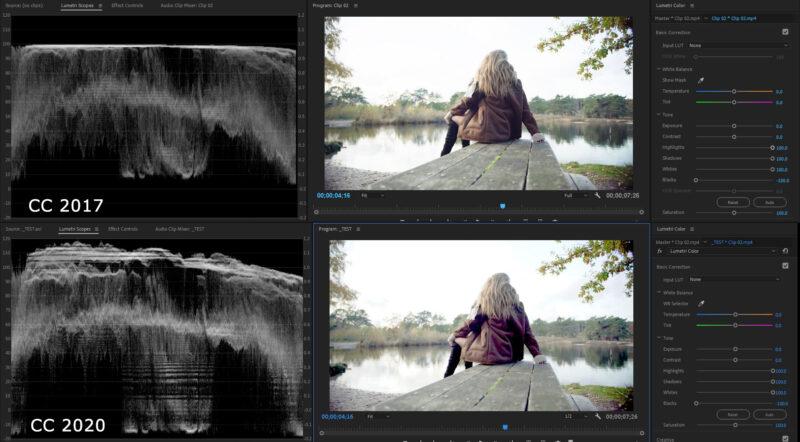
    In the meantime, I think this Waveform Luma I’m attaching really shows what I’m talking about with how it’s shredding the data into chunks causing a blocky detail-destroying mess when you move the blacks to the left even in a naturally very bright clip. I cranked the shadows, highlights and whites to help demonstrate how it turns into chunks a bit better compared to 2017.

    I’m also attaching a close up crop of the results so you can really see how much it’s being totally wrecked, with her jacket turning into blocky purple with all of the detail in the darkest parts crushed out. (Right-click -> View Image to see them at full resolution).

    This example is Clip 02 from this Premiere Pro 2020 Lumetri Color Grading series, which I’m happy to upload somewhere if someone wants to make their own tests:

    https://www.skillshare.com/classes/Premiere-Pro-Lumetri-2020-Color-Correct-Color-Grade-like-a-Pro/772047744

  • Al Jensen

    September 26, 2020 at 1:48 am

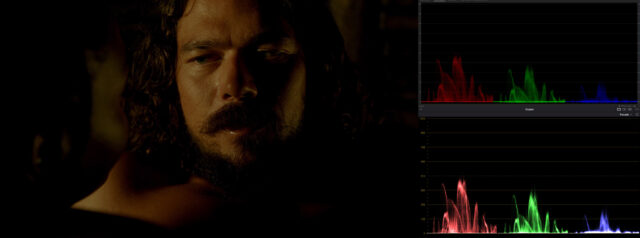
    Here’s 2020 vs. Resolve’s RGB Parade with no color correction. Looks pretty much the same to me to be honest, though I have no idea how to replicate the same Lumetri style settings in Resolve to see if it gets split up.

  • Shawn Hamer

    February 12, 2021 at 1:05 am

    Yeah, color correcting and integrity are a complete mess in Premiere. Why do we put up with it? No clue. People complain, experts point out the flaws and Adobe just…. does nothing. You can go mad trying to tune a grade or calibrate a monitor to match what Premiere is doing.

  • Al Jensen

    February 15, 2021 at 12:19 am

    Yeah, but it’s not even like it’s just slightly bad, it’s actively destroying the image, and I don’t understand why it hasn’t been fixed in literally years and why nobody talks about.

    Look at the image I posted before, which I’m reattaching here. The darker shadow areas of her coat are being totally destroyed by Lumetri in CC 2020, it’s turning into a blocky artifacty purple mess. On the other hand, CC 2017 is perfectly clean.

    The CC 2020 version is completely unusable in any professional setting, I wouldn’t let my nephew upload something that looked that bad to YouTube. I cannot for the life of me understand what’s going on here.

  • Rich Rubasch

    February 20, 2021 at 1:00 am

    I stopped trusting Lumetri several years ago when a few of us had a similar conversation. I went entirely with Red Giant’s Colorista. Works great. Since everyone is using the Adobe Suite we have no choice really, except to invest in third party software….but that is challenging if I have to exchange a project with others and they don’t use Colorista!

  • Al Jensen

    February 20, 2021 at 1:44 am

    I played around with Resolve again after originally posting this thread, but we just have so many processes that involve not just Premiere, but other Adobe products, not to mention Premiere-specific assets that don’t need to be recreated all the time, that the time investment required to jump to another product is daunting to say the least.

    I might have to take the plunge though. Fingers crossed no Windows or NVIDIA driver update breaks CC 2017 in the meantime while I continue to procrastinate!

Page 1 of 2

We use anonymous cookies to give you the best experience we can.
Our Privacy policy | GDPR Policy