Forum Replies Created
-

“Expander” is not RAID, it’s a way for SAS controllers to “see” more than one drive per lane. The capability is a part of SAS spec, but both the controller and the box must have the circuitry to support it.
If your box does have that “expander” brain, wiring it to four (or more than one) MiniSAS ports won’t work.
That said, most expander boxes have three MiniSAS ports, one “in”, two “out” – for daisy chaining. So the fact that your box has four of them means, most likely, it’s a “direct-wired” SAS box, and you do need four MiniSAS ports to handle it.
Check with Areca, they might have a recommendation (or even a part they’d sell you) for such an adapter.
Alex Gerulaitis
Systems Engineer
DV411 – Los Angeles, CA -
Not with four external “wide” 4-lane ports, to my knowledge. You could get a ARC-1882-ix-16 or a -24 (with one external 4-lane “wide” port and four or six external ones) and re-route the internal ones to the outside with SFF-8087-to-SFF-8088 adapter brackets.
There’s a good possibility though that your enclosure is “expander” type and only needs one port to handle all drives. What make / model enclosure is it?
Alex Gerulaitis
Systems Engineer
DV411 – Los Angeles, CA -
Alex Gerulaitis
January 3, 2013 at 10:58 am in reply to: Atto R680 and Stardom Sohotank file system raid failureSomething I don’t quite understand. At first you write:
[Kyle Sanborn] “On restart The ATTO banner showed up before getting into OS and showed that it did not recognize any raid volumes.”
Then you write:
[Kyle Sanborn] “In the disk management window the volumes showed up unallocated but in the ATTO config tool they showed up as online and healthy.”
If the ATTO controller doesn’t recognize any raid volumes, they won’t show up in Windows at all. The 2nd part only makes sense if you re-initialized the RAID volumes in ATTO management utility, and in that case, they’d show up in Windows asking to specify partition type, like in one of your screenshots.
I’d call ATTO right away.
Alex Gerulaitis
Systems Engineer
DV411 – Los Angeles, CA -
For some games; possibly in 3D modeling software like Maya and 3DS Max (not sure). No appreciable benefit in Premiere Pro or AE.
Alex Gerulaitis
Systems Engineer
DV411 – Los Angeles, CA -
[Adhithya Ravishankar] “Are those codecs offered on the Windows version of Blackmagic MediaExpress?”
They aren’t. MJPEG, uncompressed AVI, DPX.
[Adhithya Ravishankar] ” And, do you know how good MJPEG is, because that’s the one I hear most about?”
It’s an OK codec, the main benefit is that it’s royalty free, I think, and thus used by Library of Congress for archiving (I think).
Alex Gerulaitis
Systems Engineer
DV411 – Los Angeles, CA -
Alex Gerulaitis
December 27, 2012 at 1:33 am in reply to: Gspeed ES Pro RAID keeps disappearing from Mac, have to re-initialize![Jesse Schluntz] “This is strange because I had 2.68 TB left on the raid, and was copying 2.45 TB over to it.”
The file system has an overhead which varies depending on block size, number of files, their sizes. E.g. it’s theoretically possible for 1TB of data to take 16TB of disk space (or more) if the volume isn’t formatted properly for the application.
Do you have the stats for the data you’re copying – number of files, total size, total size on disk? (Two last numbers are never the same – at best, the last is just slightly larger than the 2nd.)
Also, how is the RAID (and volume) formatted? RAID level, stripe size, any other parameters? Next time you re-initialize it, re-format it as well. Volume: block size, file system type? Is journaling on?
Possibly it’s a FS glitch that you are running into, where the OS just can’t handle when the volume gets too close to being full.
Possibly something else is going on – but for now, it’s clearly the problem between the FS (OS) and RAID brain. Someone, somewhere, is not reporting the capacity correctly to the OS, and the OS flakes out and marks the whole volume offline.
So for now, I’d just leave a 500GB headroom on the array and consider it full when you get half a terabyte close to the limit.
Alex Gerulaitis
Systems Engineer
DV411 – Los Angeles, CA -
[Michael Garske] “Also, this CineRaid unit doesn’t require a raid card correct? It would seem all I need is the included software.”
Does not. Even the software is optional.
Alex Gerulaitis
Systems Engineer
DV411 – Los Angeles, CA -
Alex Gerulaitis
December 24, 2012 at 4:30 am in reply to: Adobe Premiere Pro CS6 loading and playing back slowlyQuicktime on Windows is a known choke point, from what I hear.
Try working with any non-Quicktime files to see if that’s the problem.
Alex Gerulaitis
Systems Engineer
DV411 – Los Angeles, CA -
Alex Gerulaitis
December 24, 2012 at 1:15 am in reply to: Gspeed ES Pro RAID keeps disappearing from Mac, have to re-initialize!eS Pro is a tried and true setup (with the ATTO card, not the older HighPoint). Other than that, I’d look at JMR boxes: US-designed, US made, US-based support. B&H sells them – I don’t, so no personal bias or vested interest, and hey – they do advertise on Cow.
Alex Gerulaitis
Systems Engineer
DV411 – Los Angeles, CA -
[Michael Garske] “What drives and raid configuration did you have on yours? “
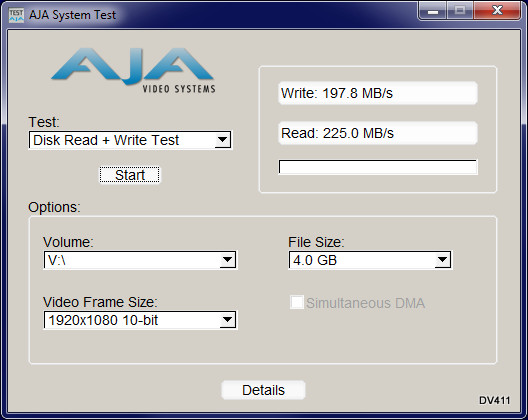
HGST Deskstars 2TB 7K3000 in RAID5 over eSATA.
[Michael Garske] “Also, what were the read/write speeds you observed? Do you think these will be fast enough to edit raw footage from?”
About 200MB/s r/w. The volume is 75% full so these aren’t the best numbers. What type of raw footage are we talking about, what camera / file format?