Forum Replies Created

  • Albert Navarro

    September 17, 2020 at 7:56 am in reply to: [PROBLEM] After Effects detects H264 mp4 as AVI

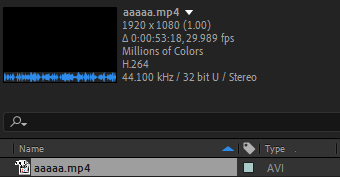
    Sorry I have just realised my screenshots can’t be seen, here are the pics again:

  • Albert Navarro

    September 17, 2020 at 7:53 am in reply to: [PROBLEM] After Effects detects H264 mp4 as AVI

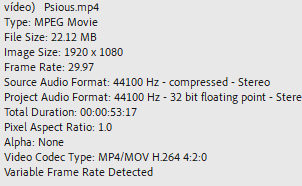
    Actually not, Premiere sees them as mp4:

    So does VLC. After seems the only want to sees them as AVI (even though it says they are encoded in H264 which makes no sense at all).

    These files are Youtube videos downloaded through a program called 4k Video Downloader. This is surely the issue with the encoding, but what I can’t understand is why is After the only problem encountering the issue. Every other program I tried just reads it correctly.

  • Albert Navarro

    September 17, 2020 at 7:50 am in reply to: [PROBLEM] After Effects detects H264 mp4 as AVI

    Yes, the K-Lite Codec Pack.

    The issue I’m having is this frame in the middle of the footage for no reason. When I play it on premiere or vlc, I have no playback issues.

    I exported the footage with this frame in it without noticing the first time, and weirdly enough, you can only see a glitch when you play it, not when you scroll through it frame by frame. But when you play it frame by frame on After before exporting, you can see it clearly tho.

  • Albert Navarro

    September 17, 2020 at 7:46 am in reply to: [PROBLEM] After Effects detects H264 mp4 as AVI

    If I convert it to another format the issue is solved, but I would like not to convert all of the files I have.

  • Hey! Thank you very much. Yeah that was basically the problem, I didn’t think of that. I actually solved it by myself before my post was even approved, so I couldn’t delete it. Sometimes you focus on the hardest things and it’s the most basic stuff that you’re doing wrong 🙂

We use anonymous cookies to give you the best experience we can.
Our Privacy policy | GDPR Policy