Creative Communities of the World Forums

The peer to peer support community for media production professionals.

Activity Forums Adobe Premiere Pro Zooming the timeline with the scroll wheel jumps to max zoom (BUG)

  • Zooming the timeline with the scroll wheel jumps to max zoom (BUG)

    Posted by Thomas Kresge on March 11, 2025 at 11:39 pm

    Zooming the timeline (in or out) with the scroll wheel (by holding the option key) jumps to a maximum zoom. If I scroll VERY slowly, I can increment out in an expected way. Premiere 2025, but have had this problem on previous versions. No such issue in any other applications (e.g., After Effects). Mac 14.6. Mouse is a Logitech MX Master 3S. Any ideas behind this? I want to reiterate that no other product of mine (including Adobe products) has this same issue.

    The attached video shows the bug in action.
    Simeon In ‘t veld replied 10 months, 2 weeks ago 2 Members · 2 Replies
  • 2 Replies
  • Simeon In ‘t veld

    July 3, 2025 at 11:14 am

    This is a known bug since 2018 I believe.. I cant believe it is now 2025 and it is still not fixed in the latest release…. Adobe, get your sh*t together!

  • Simeon In ‘t veld

    July 3, 2025 at 11:18 am

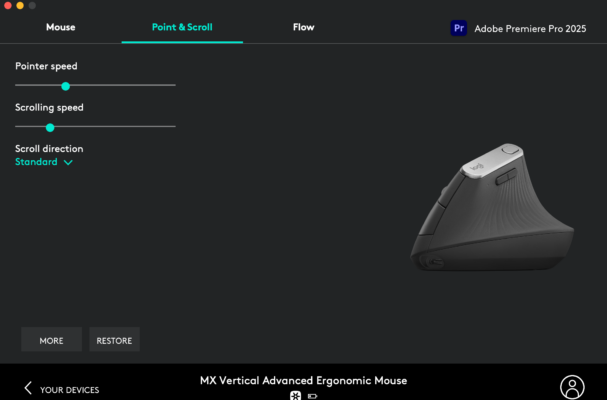
    Are you using Logitech mouse? I noticed that in logi options you can set the scroll speed per application. If you set it to a low value for premiere pro the problem is fixed. 🙂

We use anonymous cookies to give you the best experience we can.
Our Privacy policy | GDPR Policy