Creative Communities of the World Forums

The peer to peer support community for media production professionals.

Activity Forums VEGAS Pro Will my old projects and plugins on Sony Vegas Pro 13 work on the latest one?

  • Will my old projects and plugins on Sony Vegas Pro 13 work on the latest one?

    Posted by John Rodriguez on December 31, 2025 at 7:30 pm

    Looks like most Gen Z is learning video editing with DaVinci Resolve. Im a mid 30’s millenial and learned video editing on Sony Vegas Pro 13, which I am still using to this day somehow, as I refused to learn a new workflow. I wonder how much im missing on newer software.
    Im considering moving to the latest Vegas version. Im just wondering if im going to learn an entire different workflow or it’s the same?

    I also wondering if my plugin pack from Sapphire FX wil work. When I use some of these effects on my project, like S_TVDamage, the FPS are incredibly low. If I update to the latest version, will it work smoothly, or im limited by my 1660 Super? I wanted to buy the RTX 5080 Super but it’s delayed again.

    I just wish to edit things smoothly using a reasonble amount effects, but even on draft mode, some effects slow the hell out of my projects, and end up disabling them, and after a while of adding tracks and so on, even then it’s not enough and the FPS are slow. I need an upgrade. I think my CPU is enough (3950X) but im looking to upgrade software and GPU but I don’t want to learn a new workflow so I guess I should go with whatever latest Vegas version is being used now.

    Edward Troxel replied 7 months ago 2 Members · 5 Replies
  • 5 Replies
  • Edward Troxel

    December 31, 2025 at 10:08 pm

    The good news is that your “workflow” should not need to change. The timeline works the same way in 23 as it did in 13 but there are a bunch of new features – some of which may actually help your workflow.

    As for the Boris products, the answer is “maybe” as you did not say the source of the plugin (was it a bundle?) and the newer versions of VEGAS may require a new version of Boris. So the best I can say is “maybe.” As for any NewBlue products, I can say that they will still work unless it was bundled with a specific version.

    Your best option is to install the demo of VEGAS Pro 23 and test it out.

  • John Rodriguez

    January 1, 2026 at 12:08 am

    Im not sure what NewBlue products are. I know I have the Sapphire FX bundle and some are named “HitFilms”, not sure if I got 2 plugin bundles, I’ve got these from like 10 years ago so I don’t remember. Im guessing I will need to buy the new versions.
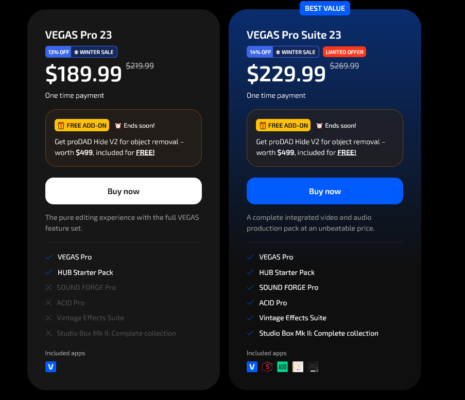
    Is there a Vegas bundle that comes with these plugins preinstalled?
    The ones I use the most are the wipe, warp, blur, shake, etc but I would just like to have them all.

  • Edward Troxel

    January 2, 2026 at 4:07 pm

    http://www.newbluefx.com – additional plugins for VEGAS like Boris and are frequently bundled with VEGAs as well.

    The only way to know with your specific plugins is to install the trial and test it.

    As for what is included in the current version, you’ll need to go to http://www.vegascreativesoftware.com and check out the offerings.

  • John Rodriguez

    January 4, 2026 at 1:54 am

    Im not seeing that these plugins are included on the Suite pack which seems to be the most expensive one.

  • Edward Troxel

    January 4, 2026 at 1:26 pm

    What you see listed is what is currently bundled. Bundles change from version to version and offer to offer…

We use anonymous cookies to give you the best experience we can.
Our Privacy policy | GDPR Policy