Creative Communities of the World Forums

The peer to peer support community for media production professionals.

Activity Forums Adobe Premiere Pro Washed-out JPEGs in Premiere

  • Washed-out JPEGs in Premiere

    Posted by Margot Buff on December 18, 2021 at 11:57 pm

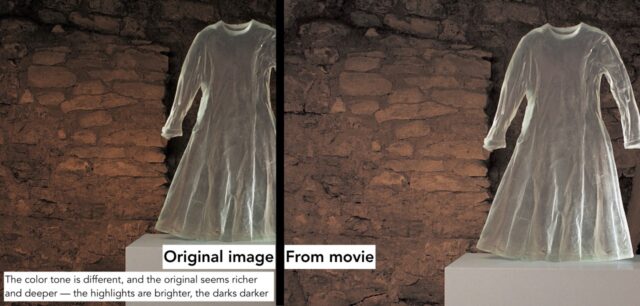
    Hello all – I’ve got an issue on Premiere Pro 2020 with jpeg files appearing slightly washed out in the program monitor, and not in the source window. When exported, the parts of the video with those jpegs appeared washed out. (But it doesn’t seem to be a monitor problem, as the source window is fine!) Any advice would be appreciated – and apologies if we’re in basic territory.

    Below is a grab comparing the original jpeg with how it appears in the export.


    Tero Ahlfors replied 4 years, 5 months ago 3 Members · 2 Replies
  • 2 Replies
  • Eric Santiago

    December 19, 2021 at 5:20 am

    Have you opened the original JPEG in Photoshop?

    Could be a color space issue.

  • Tero Ahlfors

    December 20, 2021 at 6:29 am

    What format is the export and what program are you watching it with?

We use anonymous cookies to give you the best experience we can.
Our Privacy policy | GDPR Policy