Creative Communities of the World Forums

The peer to peer support community for media production professionals.

Activity Forums Apple Final Cut Pro Legacy WARNING!!!: QT Properties: Don’t touch me please..

  • WARNING!!!: QT Properties: Don’t touch me please..

    Posted by Rafael Amador on May 28, 2008 at 11:08 am

    As everybody, to get my 16×9 SD movies properly displayed in QT I used to change the parameters in the “Properties” in the Player (Comm-J)
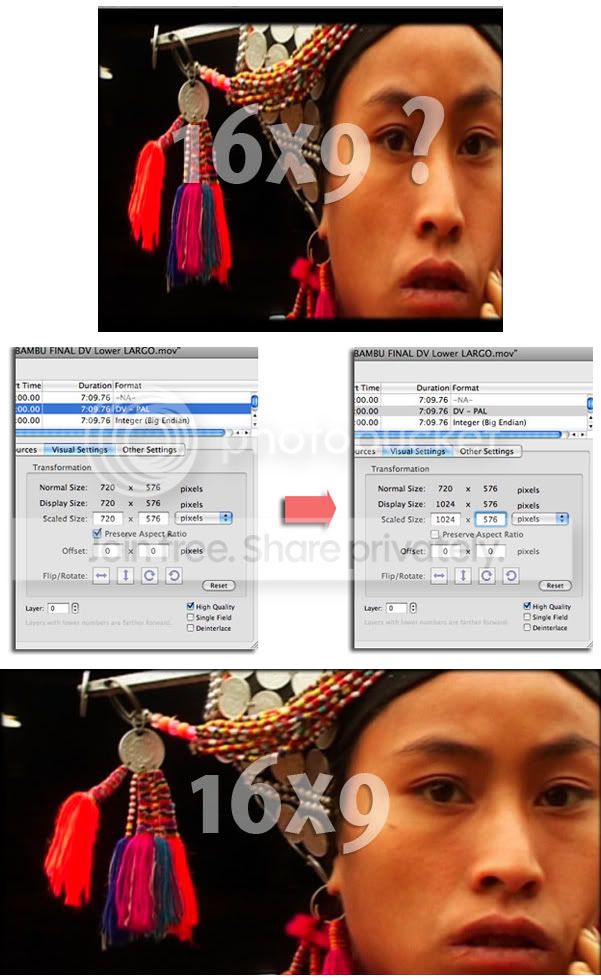
    Picture 1

    With older versions of QT saving those new “Properties” was not a problem.
    Those changes only affected the QT Player.

    With the last versions of QT is not like that anymore and YOU CAN GET IN BIG TROUBLES IF YOU SAVE THOSE SETTING.
    See what happens if I re-import the clips (SD PAL Anamorphic 48Khz) with the new setting to FC:

    The first thing you will see that is wrong is that when you click the clip, it shows up in the Viewer with his proper aspect ratio. This shouldn’t be like that because FC don’t recognize “Anamorphic” (you normally have to check it by hand).
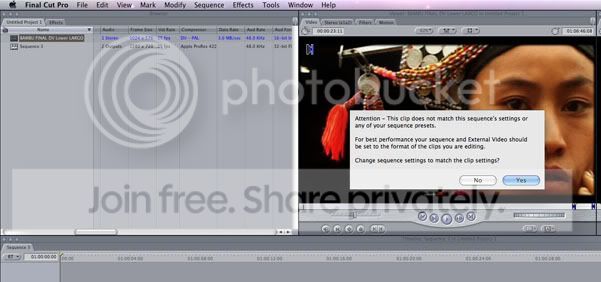
    Picture 2

    Then when you try to drag this clip (DV PAL Anamorphic) to a sequence with the same parameters you find that there is something else wrong.
    If you look at the Browser you will see that FC is interpreting the footage with the parameters I’d set in the QT Properties.
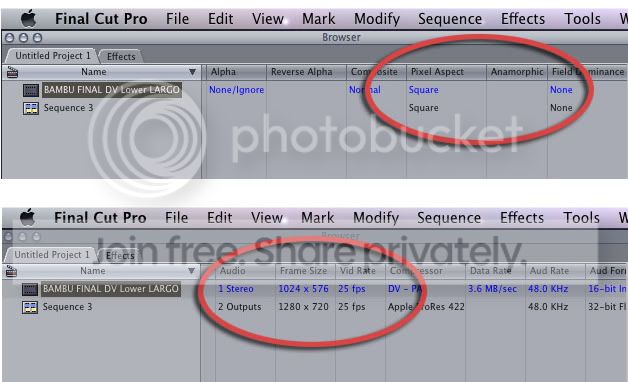
    Photobucket

    If you choose to keep the parameters of the Sequence, you will get a GREEN LINE.
    You will need to render ALL. And there is no way to change those parameters within FC.
    You need to go back to QT , reset the original properties and re-import your footage.
    Sorry I had no NTSC footage to make the test. I guess will be the same. You can try it.
    Cheers.

    Mac OX 10.5.2-FC 6.02-QT 7.4.1
    G5 2x2Gh 4GbRAM-BlackMagic Extreme
    PMBP 17″Core2Duo 4GbRAM-AJA ioHD
    JVC DTV-17″
    SONY EX-1 . SONY PD170
    ..and always a big mess on top of the table.

    Rafael Amador replied 18 years ago 3 Members · 3 Replies
  • 3 Replies
  • Nick Price

    May 28, 2008 at 1:06 pm

    Hi Rafael,
    i use a different setting in QT to alter the look of 16:9 squashed. Rather than selecting the video track, in the properties menu, select the one above (usually its the name of the QT movie). Then under the presentation tab tick ‘conform apaeture to’. that usually does it for me and doesnt affect FCP.

    hope that makes sense. thanks
    nick

  • Jeremy Garchow

    May 28, 2008 at 3:38 pm

    Well, I am not sure why you’d want to change those properties to a final movie anyway, BUT if you do change them and then reimport that movie to FCP, you can simply right click on the movie in FCP and choose ‘Open in Editor’, and change the frame size back and close the movie and save it. When you return to FCP, you will notice that the movie will go offline for a split second then reconnect to the movie. You can then change the PAR by right clicking in the Pixel Aspect column and correcting it to 601 PAL or NTSC or whatever, from ‘Square’. If that clip was in a timeline, you can then select the clip in the timeline and remove distort and basic motion attributes, and it should line up perfectly in your anamorphic timeline.

    Jeremy

  • Rafael Amador

    May 28, 2008 at 4:59 pm

    Hi Nick,
    Your method works great.
    Is strange because when you click the “‘conform apaeture to’, in the Video track-Visual Setting you get the same 1024×574 pixels. But in the finder and in the FC Browser now the clips appear as 720×576 and are displayed Anamorphic.

    Hi Jeremy,
    I don’t need to change the aspect of my movies. I don’t get shock when my Anamorphic pictures get distorted in the QT player. But everyday you find posts of somebody that can not sleep for this issue.
    Many people want to see their movies with the proper aspect in QT. I just wanted to warn them that if the save those changes, they can get in many problems back in FC.
    Normally the people that ask: “Why QT show my Anamorphic stretched?” don’t have the knowledge you have. They could hardly understand the issue ant take the steps that you suggest.
    Steps that won’t avoid you have to delete everything from your time-line. There is nothing with distort or any other attribute. Is simply that your clips shows up as 1024×576 , and there is no way to change that.
    You will need to delete all your sequence.

    Mac OX 10.5.2-FC 6.02-QT 7.4.1
    G5 2x2Gh 4GbRAM-BlackMagic Extreme
    PMBP 17″Core2Duo 4GbRAM-AJA ioHD
    JVC DTV-17″
    SONY EX-1 . SONY PD170
    ..and always a big mess on top of the table.

We use anonymous cookies to give you the best experience we can.
Our Privacy policy | GDPR Policy