-
vegas pro 1 GPU Acceleration settings
I’m using Vegas pro 19. I have a question on GPU Acceleration settings.
Everything I read told me to do the following to implement GPU acceleration in Vegas Pro 19
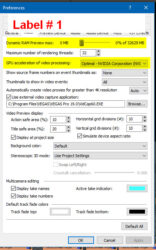
1. Go to Options – Preference – Video and make sure to set dynamic ram to 0 and select your Video Card. No problem – done. (see screenshot below, labeled #1)
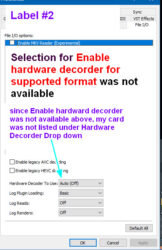
2. The next setting to set was under File I/0. Two changes, but neither selection is available.
I’m supposed to select “Enable hardware decoder for supported format, and below that select my video card from the drop-down menu for Hardware Decoder to Use.
Obviously, if I don’t have ‘Enable hardware decoder for supported format” my video card is not going to be listed under the dropdown for Hardware Decoder to use. (see screenshot labeled #2)
My Graphic card is NVIDIA GeForce GTX 1060 6GB. I contacted Nvidia tech support. No response.
What am I doing wrong and is there a solution?
Thanks