

-
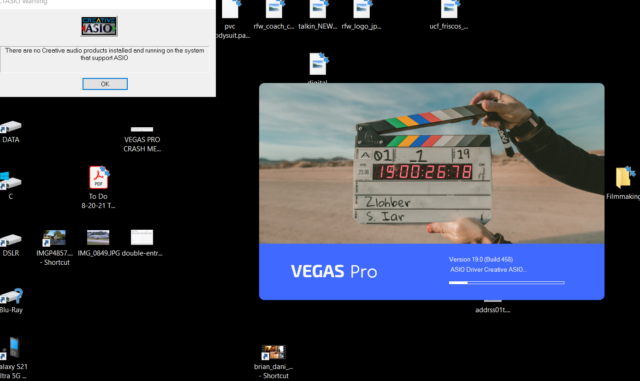
V19 message interrupts program opening
Posted by John Perez on January 10, 2022 at 9:07 pmI’m getting this message every time I open program. I used to have the soundcard that it’s referring to but I know longer have it, yet its still looking for it. what gives? Thx
 John Perez replied 4 years, 8 months ago 3 Members · 6 Replies
 -
6 Replies
-

Steve Rhoden
January 10, 2022 at 10:39 pmYou need to completely uninstall all traces of the ASIO Driver off your computer.
-

John Perez
January 12, 2022 at 11:44 pmIt won’t let me. Something about a “module ” not being found.
-

Graham Bernard
January 13, 2022 at 7:05 amDo a Vegas Factory Reset. You need to make/force VP to take notice of what you’ve got now. Can you imagine the mess we’d all be in if just by swapping a sound card would make VP react like this? Is it possible you’ve got sound plugins dependant on that ASIO? Are you attempting to open a VP Project you had working with the old Sound Card? Could you open VP not using the old veg? A missing Module is flaky. A missing ASIO module is nasty. Have you tried viewing your Audio Setups in Windows? Have you got the NEW card recognised?
So, to summarise:
1] Do a VP Factory reset.
2] Confirm Windows is recognising your new Sound Card.
3] Try opening a new Veg and see if the new card is recognised there.
-
Steve Rhoden
January 15, 2022 at 11:48 amok, when that happens, what i would recommend you to do is hunt thru your installation/system folders and remove all files ASIO related or even go into your registry and remove everything ASIO there also (removing from the registry is not hard, you just type in what you are searching for, and it shows you)…. then you should be good to go!
Reply to this Discussion! Login or Sign Up