Creative Communities of the World Forums

The peer to peer support community for media production professionals.

Activity Forums Adobe Premiere Pro Unable to record stereo Voice tracks using Motu audio interface with PP

  • Unable to record stereo Voice tracks using Motu audio interface with PP

    Posted by Karen Lee on July 2, 2023 at 8:07 pm

    Hi, I’ve been trying to record a simple voice track in stereo using a Shure mic plugged in to one channel on my Motu M2 audio interface on PP 23.0 with current Mac OS. Won’t lay down stereo, although I’ve (accidentally) managed to alter an existing mono track to stereo-sounding. It doesn’t show two tracks but it’s coming in both L and R ear of headphones. It’s inelegant and I’m not sure the quality of audio is the best possible. Of course I spent 1.5 hours with Adobe tech support who played endlessly then told me the problem is with the Motu interface, but it lays down stereo tracks fine in Garage Band. I found a couple tutorials on Youtube that showed how to make this alteration in new tracks, i.e. recording in mono device to create stereo track, but alas PP altered their process so the approach shown no longer works. Any advice?

    Ann Bens replied 2 years, 10 months ago 3 Members · 3 Replies
  • 3 Replies
  • Mads Nybo jørgensen

    July 2, 2023 at 9:32 pm

    Hey Karen,

    Sorry you are having these problems, but the Adobe way of managing audio tracks PPro requires you to have a PHD…

    …I have a Broadcast client with only space for 4-tracks of audio on files on their media server. And when it comes to re-versioning, we have to separate out V.O., I/V, Music and SFX. Where as most other systems will just allow you to “patch it out”. On Adobe it takes a number of steps before you can get to that point.

    When you create a new sequence, unless you have already done this, in the “New Sequence” pop-up window jump to the “Tracks” tab and check your settings there. The tracks may be set to Mono, in which case you need to make them stereo.

    If this is the solution, do remember to “SAVE PRESET”, or you will forever have to go back and sort it out.

    If the above is not the case, although Adobe Audition is not a software that I use often, I would suggest that you pop in there and test if that will record your V.O. in Stereo?
    If it does, you can tell the Adobe tech support to step up, stop blaming third party devices – and instead step-up and find a fix for your problem.

    Hope that this helps.

    Atb
    Mads

  • Karen Lee

    July 3, 2023 at 9:42 am

    Thanks for your validation of the ridiculousness, and for explaining the techniques you’ve used successfully.

    I tried a new sequence with tracks in stereo — they didn’t offer plain stereo, that option was grayed out, so I tried stereo submix and other options provided. The new voice track I recorded was still in mono.

    Another attempt was to copy and paste attributes but this doesn’t give the option of copying the track settings.

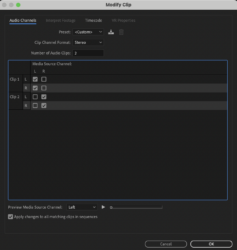
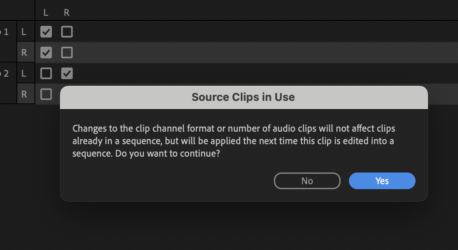
    The only thing that works for me is to right click on the track in the project panel and change audio tracks in the way shown in the attached screen shot. It offers a promise to apply the settings to future audio clips in the sequence but this does not hold up.

    I’m not sure how to save preset as you advised because the only way I know to do that is from the effect control panel which offers other audio modifications but not the track configuration. So for now at least I manually modify each voice track laid down. Oy.

    My love-hate relationship with PP continues! 🙂

  • Ann Bens

    July 3, 2023 at 4:44 pm

    If your mic is mono you wont get stereo in the timeline.

    You need to modify the file in the Project window and then add to the timeline.

    Might want to have a look at Audition. Imo far more easy to record voice over.

We use anonymous cookies to give you the best experience we can.
Our Privacy policy | GDPR Policy