Creative Communities of the World Forums

The peer to peer support community for media production professionals.

Activity Forums Adobe After Effects Subtract value from all keyframes

  • Subtract value from all keyframes

    Posted by Jeremy Mullen on November 24, 2010 at 7:34 pm

    One of those things that feels like it has an easy solution…

    I’ve applied tracking data to a layer’s rotation parameter, and the whole layer is keeled over about 60 degrees. How can I use those keyframes but make a global adjustment by that value?

    I’ve tried precomposing but other values are being controlled by expressions and precomping disconnects them. Expressions override the tracking keyframes. Simple way to subtract 60 degs from every keyframe?

    Simon King replied 2 years, 2 months ago 4 Members · 4 Replies
  • 4 Replies
  • Jeremy Mullen

    November 24, 2010 at 7:44 pm

    Okay, sorry, Please disregard. I needed more coffee. Duh, select all keyframes, pull value slider. Morning!

  • Todd Kopriva

    November 24, 2010 at 8:59 pm

    It seems that you found the simple answer. There are some more approaches listed for various situations here.

    ———————————————————————————————————
    Todd Kopriva, Adobe Systems Incorporated
    Technical Support for professional video software
    After Effects Help & Support
    Premiere Pro Help & Support
    ———————————————————————————————————

  • Matt Ratcliffe

    November 24, 2010 at 11:23 pm

    You could also add an expression to the rotation of value+60 if a clockwise correction is needed, value-60 if anti-clockwise.

  • Simon King

    February 29, 2024 at 7:20 am

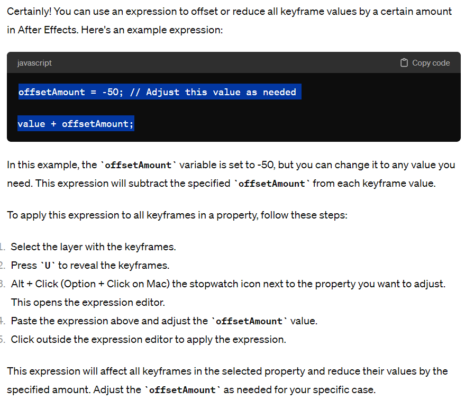
    Turns out ChatGPT has the answer.

We use anonymous cookies to give you the best experience we can.
Our Privacy policy | GDPR Policy