Creative Communities of the World Forums

The peer to peer support community for media production professionals.

Activity Forums Maxon Cinema 4D start CLONER animation in different frame

  • start CLONER animation in different frame

    Posted by Mauricio Barrientos on September 19, 2023 at 7:32 pm

    Hello….here again requiring your help.
    thank you.
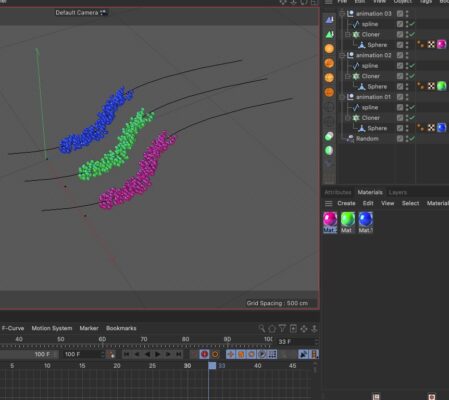
    I have two CLONNERS with their wanting PLINES. mock. a fluid through one spline each.
    but I need the blue to come out first, and for the green to come out or start at the same speed in frame 20, and in the frame 50, for the red fluid to start and begin to move, at the same speed.
    The three are identical, but they start at a different time.
    I have tried this but I have not been able to.
    I leave the photography and the cinema file here below.
    Please I need help any comments will be greatly appreciated.
    thank you

    here link to download the file c4d.:

    https://drive.google.com/file/d/1ZQk8L-pWrbOARkqs7UYucHNpXo0lFj3j/view?usp=sharing

    .

    .

    Mauricio Barrientos replied 2 years, 7 months ago 2 Members · 2 Replies
  • 2 Replies
  • George Charoupas

    September 19, 2023 at 8:20 pm
  • Mauricio Barrientos

    September 19, 2023 at 9:56 pm

    YES thanks … !!!!

    What I am looking for is to create a fluid of particles that:

    FIRST:
    BLUE particles pass from one place to another.

    SECOND:
    The green particles pass from one place to another.

    and THIRD,
    that the last particles pass from one place to another.

    Of course next a spline line and cloner.
    So my question is:
    is there another way to do this? Or do you recommend that I continue in this same way?

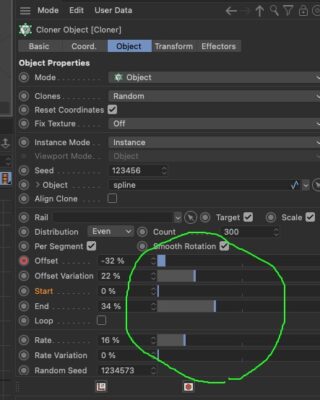
    I wonder since it is giving me too much trouble, synchronizing the movements, playing with the SLIDERS that are in the photo below.
    It’s all a mess.
    That’s why I ask if there is another, more effective way for a group of particles to move from one place to another following a SPLINE, giving them values…. please help.
    I leave the photo and video of what I am doing.
    thank you.

    .

    If you notice in this video, the blood even returns to me, due to the same hassle of controlling it with so many sliders HAHAHA
    thanks for so much help.

    https://www.youtube.com/shorts/Q-rmUDXo9qI?feature=share

We use anonymous cookies to give you the best experience we can.
Our Privacy policy | GDPR Policy