Creative Communities of the World Forums

The peer to peer support community for media production professionals.

Activity Forums Adobe Illustrator Smoothing Line Edges

  • Smoothing Line Edges

    Posted by Matthew Rozzi on February 20, 2022 at 2:17 am

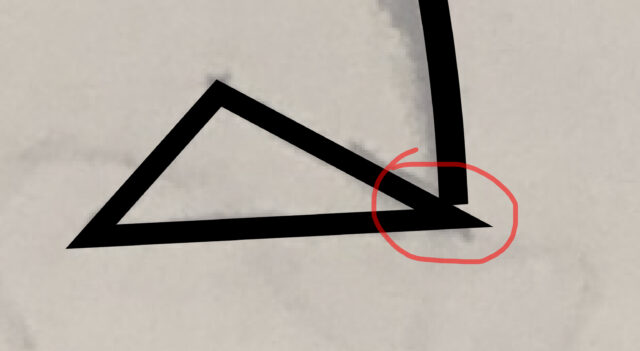
    I’m trying to smooth out a corner as illustrated in the screenshot. This is a simple triangle, but that one corner came out way too sharp. I haven’t been able to find a clear answer for this; one tool that was brought to my attention is the smooth tool, but that doesn’t seem to be the right solution for this. Any help is appreciated. Thanks

    Usama Aslam replied 2 years, 4 months ago 2 Members · 1 Reply
  • 1 Reply
  • Usama Aslam

    January 23, 2024 at 10:20 pm

    You can use direct selection tool and select the corner anchor point and drag to manually adjust the corners. Latest updates of Ai consists a newer little circular option at the edges of all vectors, just click and drag to make any corner point smooth as per requirement. You can also draw a star shape from the toolbar panel and simultaneously press down arrow to directly create a new equally sized triangle.

We use anonymous cookies to give you the best experience we can.
Our Privacy policy | GDPR Policy