

Activity › Forums › Maxon Cinema 4D › Rope simulation stiffness
-
Rope simulation stiffness
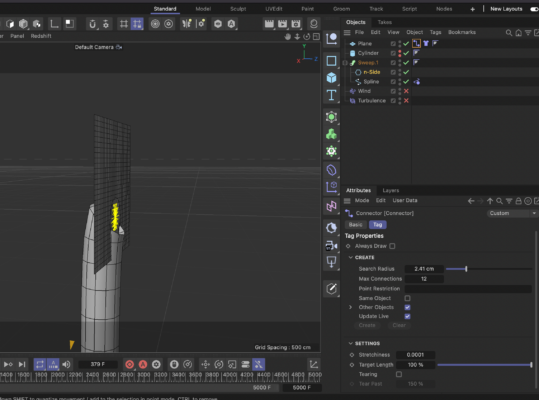
Posted by Anne-jan Reijn on February 25, 2025 at 8:36 pmHi there. I’m trying to have a rope attached to an object horizontally and then dangling down. But I can’t figure out how to give the rope material some stiffness, so it doesn’t fall straight down but more bending down. Any one an idea?
 Kouraib Abdmalek replied 3 months, 3 weeks ago 3 Members · 24 Replies
 -
24 Replies
-

Kouraib Abdmalek
February 26, 2025 at 9:44 amHi Anne-jan,
It may be that the spline you are using on the rope only has two points, you need several points and preferably evenly spaced to get a perfect simulation of the rope when exposed to the wind or turbulence effect, I have put a screen recording below to explain how to do this, I hope this helps you.
-

Anne-jan Reijn
February 26, 2025 at 8:36 pmDear Kouraib,
Thank you so much for your reply. Though I’m thinking perhaps my question wasn’t formulated clear enough. Have you checked out the file-link I added? Underneath an upload to creativecow as well…
The simulation is working well. It seems the method you use is slightly different, but both working pretty much the same I think.
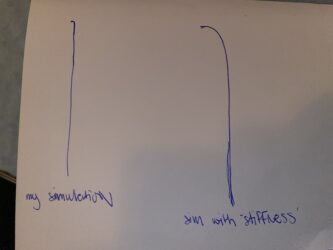
My issue is that a normal rope would have a certain stiffness – making it not fall straight down, but sort of curving down. See the illustration below for an attempt to make things more clear.
-
Kouraib Abdmalek
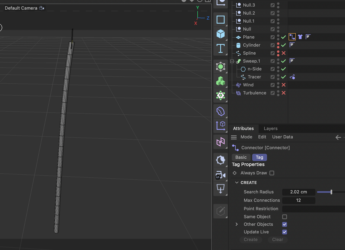
February 27, 2025 at 8:59 amThanks for the clarification! You could use the tracer to get the curving you want. I’ve put a screen recording below explaining how to do this. Also, you could add the cloth tag to the sweep and adjust the settings later if you want a more fluid effect. I hope this helps you.
-
Anne-jan Reijn
March 3, 2025 at 7:56 pmHi Kouraib,
The behaviour of your screen-recording is exactly what I’m looking for. Somehow my version is not working though. I can’t figure out the difference between your version and mine. Can you by any chance? Or would it be possible to share your file with me here?
-
Kouraib Abdmalek
March 4, 2025 at 8:43 amHappy this is what you want, it looks like you need to make the Tracer editable by clicking on it and then press C so that the tracer becomes a Spline as in the screen recording attached, about the file, with pleasure! I’ve attached it for you below, let me know if the file works on your version.
-
Anne-jan Reijn
March 4, 2025 at 6:58 pmstrange. mine is still not working… before making it editable wasn’t necessary, but now it was. so made it editable, then for some reason had to pull down some connections in the connector. then it worked as before. but not as desired…
-
Kouraib Abdmalek
March 5, 2025 at 9:06 amI opened your file and it worked fine, it seems that some simulation tags are not working between my version and your version due to possible updates related to that, I suggest that you clear the link and then create it again and if that does not work then delete the connector tag and the cloth tag (also the rope one if you want to make sure) and then create a new tag on your version with the same settings as before, this should work if there is no bug in your version.
-
Anne-jan Reijn
March 6, 2025 at 11:47 amhmmm. rebuild the whole thing, but no change.
I’m working in 2023.01 on a mac. what version are you working in?
-
Kouraib Abdmalek
March 7, 2025 at 7:39 amI’m working on the 2024.3.2 version, but I think I figured out where the problem is, it seems you didn’t set the anchor point in the Rope tag, let’s go back to the “splinerope12” file and make the tracer editible then set the anchor point, you’ll notice the point color turned purple as in the screen recording below, it should work for you this time. let me know what you come up with.
Reply to this Discussion! Login or Sign Up