

-
Replicate after effects wiggler
Hi guys, I am developing my own extension and I would like to add a wiggler function to it with the same functionality as the AE standard’s plugin( which you can find at window-wiggler) but I want to be able to save existing wiggler settings to quickly access it later. I want to add at least 4 buttons that will hold the settings
I don’t need to completely remake the plugin from scratch, so I was wondering if is it possible to access its source code to replicate it and add some new features or somehow redirect setting from my script(extension) to the plugin and run it?In case if it is not possible, I would like to ask another question about how to build the wiggler.
Please correct me about the logic and math behind the wiggler:
1. any time you press “apply” it calculates the random range with the top range value up to n (Magnitude value) – for example in the case of Magnitude = 1.0 the random range can be [0.0-0.4].
2. then it decides will the value from the range from step 1 be deducted or added to the current property1 and 2 steps are repeated as many times as is frequency number
for example, the property is the position
keyframe 1 values: 100px, 100px
keyframe 2 values: 100px, 100px (it stays the same)
the time between keys is 1 sec
the settings are:
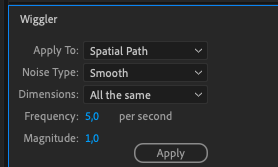
“apply to: spatial path
noise: Smooth
dimension: all the same
Freq: 5
Mag: 1.0″so it divides the time space between key1 and key 2 (1 sec) for 5 equal time ranges. For each time range, it randomly selects numbers up to 1.0 each, then it decides for each range will the number be positive or negative and then it adds the numbers to the position values with a bell curves progression. for example, if the randomly selected number for the first time range is 0.5 and it is positive then it will do something like this:
1 frame x: 100 + 0.1, y: 100+0.12 frame x: 100 + 0.3, y: 100+0.3
3 frame x: 100 + 0.5, y: 100+0.5
4 frame x: 100 + 0.3, y: 100+0.3
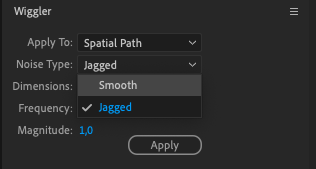
5 frame x: 100 + 0.1, y: 100+0.1However I am not sure how the noise type works here

Sorry, there were no replies found.