Creative Communities of the World Forums

The peer to peer support community for media production professionals.

Activity Forums Adobe Photoshop Replace part of an image in photoshop using a black and white matte

  • Replace part of an image in photoshop using a black and white matte

    Posted by Keith Vickers on September 17, 2020 at 9:50 am

    Hi guys, I am exporting an image from Cinema 4d. I also export a mask matte for certain parts of the image I want to change in post processing, a black and white version of part of the image.

    I know I can change colours with an adjustment layer.

    How would I add an image to that or replace an existing image?

    Any help is most appreciated.

    Brendon Murphy replied 5 years, 7 months ago 2 Members · 1 Reply
  • 1 Reply
  • Brendon Murphy

    September 29, 2020 at 2:42 am

    Hi, Keith.

    1. Drop your black and white mask into the document and copy it to the clipboard like this:

    Ctrl+A to select all, then with your C4D mask selected, ctrl+C to copy. Turn off the layer and ctrl+D to deselect.

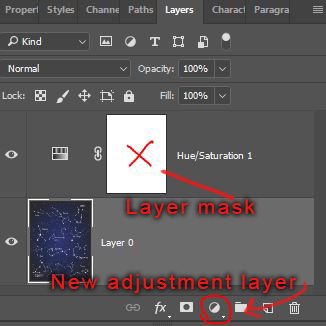
    2. Add a new adjustment layer, then hold the alt key while clicking the layer mask (see red X in the image below). When it opens, ctrl+V to paste.

    3. Click on another layer to return to the main view.

We use anonymous cookies to give you the best experience we can.
Our Privacy policy | GDPR Policy