

Activity › Forums › Apple Final Cut Pro Legacy › render/interlace problem
-
render/interlace problem
Posted by Sean Kimber on January 12, 2009 at 5:36 pmHi,
I’m new to Final Cut Pro, although I’ve used AVID for years. I created text that scales up from nothing and then distorts into itself (using the aspect ratio) to reveal a different text clip. I’m using the text generator inside Final Cut Pro itself. My problem is everything looks great until I render. Then, suddenly, it ends up looking really interlaced and distorted. Are there any ideas on what I might be doing wrong? Thanks!
-Sean
Sean Kimber replied 17 years, 8 months ago 5 Members · 13 Replies -
13 Replies
-

David Roth weiss
January 12, 2009 at 6:32 pmFirst, you should be using Boris Title 3D, which is automatically installed with FCP, never the “legacy” FCP title generator.
Next, how are you monitoring, what are your sequence settings, and your media drive setup, etc. The canvas in FCP is by default set to drop down to a lower resolution to allow realtime playback, and that could be your problem, but I can’t be sure unless you share more facts.
Also, be sure to set your canvas to display at 100%, otherwise your material being scaled and will never look good.
David Roth Weiss
Director/Editor
David Weiss Productions, Inc.
Los AngelesPOST-PRODUCTION WITHOUT THE USUAL INSANITY ™
A forum host of Creative COW’s Apple Final Cut Pro, Business & Marketing, and Indie Film & Documentary forums.
-

Sean Kimber
January 12, 2009 at 6:41 pmMy sequence is an NTSC DV sequence with lower field first. I unfortunately don’t have a broadcast monitor at the moment, so I only have my computer screen to go by. (I have been bugging the station’s engineer repeatedly for one, but no dice so far). While I have the sequence at the “Fit to Window” setting, I did have it at 100% before and the problem was still there. I actually exported the end part as a quicktime movie, and it showed up on that. I thought the problem was just an interlacing problem, but the shot is frozen on my screen and I’m actually seeing what almost looks like a vertical interlacing distortion.
I will try another program if that’s what’s recommended. I figured that the text and movement was so basic I’d be able to use the text generator itself. Thanks for your help!
-
Sean Kimber
January 12, 2009 at 7:12 pmUPDATE: I created a new text clip using the Boris titler (which is a great application I was completely unaware of. Thank you for pointing it out!) The text looked great…until I hit render. Then the same problem occured again. Any ideas? Thanks!
-
Sean Kimber
January 12, 2009 at 7:23 pmHere is a link to a screenshot of what the text looks like after rendering. The text is supposed to read “News You Need to Know” It just looks like a lot of jumbled garbage. I figured this might help a bit. I did also try to erase my render files from the second drive before re-rendering the text (with this result). No success. Thanks.
https://i118.photobucket.com/albums/o109/sean_kimber/Picture1.png
-
David Roth weiss
January 12, 2009 at 7:25 pmMake sure your RT settings (that’s the small RT dropdown to the very upper left of your timeline) are set as mine are in the following picture:

David Roth Weiss
Director/Editor
David Weiss Productions, Inc.
Los AngelesPOST-PRODUCTION WITHOUT THE USUAL INSANITY ™
A forum host of Creative COW’s Apple Final Cut Pro, Business & Marketing, and Indie Film & Documentary forums.
-
Sean Kimber
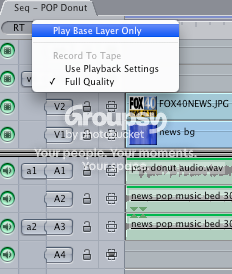
January 12, 2009 at 7:29 pmFor some reason I don’t have a lot of those options. Here is a screenshot of what comes up when I hit the “RT” Button.
-
David Roth weiss
January 12, 2009 at 7:38 pmSounds like your sequence settings are wrong and set to some funky non-RT codec.
Sean, you really should watch the following tutorial, which will show you precisely how you should setup every single FCP project you ever do. Follow it, and never deviate…
https://library.creativecow.net/articles/biscardi_walter/realtime_sequences.phpDavid Roth Weiss
Director/Editor
David Weiss Productions, Inc.
Los AngelesPOST-PRODUCTION WITHOUT THE USUAL INSANITY ™
A forum host of Creative COW’s Apple Final Cut Pro, Business & Marketing, and Indie Film & Documentary forums.
-
Sean Kimber
January 12, 2009 at 7:54 pmThank you for the suggestion. I had done all of this, but have narrowed the problem down. The background element for this spot was created in After Effects CS3. I rendered the element in AE using Quicktime Animation at the best settings and in a 720 by 480 format. When I imported the file into FCP and put it on my timeline originally, it said the clip didn’t match the sequence (which I thought was weird, since I had made an NTSC DV format on my easy setup menu) and it asked me if I wanted to change the sequence to match the clip. I said yes. Well, I just deleted that sequence and started over. I noticed before I put the clip on the timeline (and FCP had me change the setting) that the RT menu was complete. However, afterwards, it was that shortened menu I posted before. The ONLY difference between the clip’s settings and the NTSC DV Sequence settings is the compression….Animation vs. DV. So, should I be exporting in a different format in After Effects? Thanks again for all of your help!
-
Sean Kimber
January 12, 2009 at 8:23 pmFinal Update, I swear. That seems to have fixed the problem. I exported as a DV/DVCPRO – NTSC file instead of a Quicktime Animation and Final Cut seems happier with that format. Apparently, it doesn’t like the Animation Codec. Thank you very much, again, for all of your help.
-
David Bogie
January 12, 2009 at 10:07 pmYou could have also changed the sequence settings to DV.
Rednering out of AE using Animation is a standard practice but it’s only necessary if you’re using the alpha or need to exchange files with another user on a separate system.
Animation is one of the original, lossless codecs and it is the only non-proprietary codec of which I aware that carries am alpha flawlessly.bogiesan

Reply to this Discussion! Login or Sign Up