

Activity › Forums › Adobe Premiere Pro › Rendering Mpeg-2 for Broadcast Sermons causes tremendous loss of quality
-
Rendering Mpeg-2 for Broadcast Sermons causes tremendous loss of quality
Posted by Andre Watts on September 17, 2020 at 5:14 amHello,
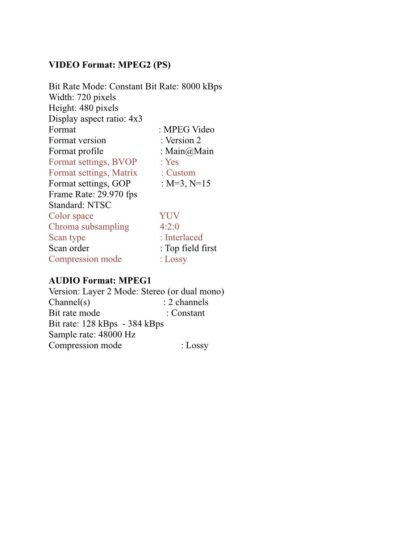
My church just purchased a total of (4) 4k/HD cameras to record our sermons. Once the (4) cameras are switched, we render the file as an H.264 file 1080p in Adobe Premiere. The qualty looks amazing. Unfortunately, the network that we submit our messages to only accepts standard definion mpeg-2 files(See the attached parameter sheet).
So in essence, we have to accomodate the network by reducing the quality of our video files. (See the attached 480p vs 1080p) So does anyone have a suggestion on how we can make the quality of our video files look much better than what they’ve been? Does rendering an Mpeg-2 both automatically and drastically reduce the quality or is it the scaling down from 1080p to 480p, or both? Is there something I can do in the advanced settings to improve the quality? Would using Adobe Encoder to render out the video be better than rendering out of Premiere?
Thanks for any help you can provide!
 Todd Perchert replied 5 years, 10 months ago 8 Members · 11 Replies
 -
11 Replies


-

Ron Lindeboom
September 17, 2020 at 5:56 amNo offense but your group needs to find a new company to submit to. MPEG2 has not been a standard for many years now and signal degradation is unavoidable with MPEG2 and is why it was abandoned. The current standard is MPEG4 and your work and the quality of your cameras will be showcased with it.
-

Tero Ahlfors
September 17, 2020 at 9:33 amThe problem isn’t MPEG 2 as it still sees a lot of use eg. XDCAM and DVDs. The problem is that going from 4K/HD to SD one will lose a lot of resolution and there’s nothing you can do about that.
-

Herb Sevush
September 17, 2020 at 12:59 pm“Does rendering an Mpeg-2 both automatically and drastically reduce the quality or is it the scaling down from 1080p to 480p, or both?”
Both. It’s not just the size reduction alone, NTSC (480) is interlaced, which further degrades the look.
“Is there something I can do in the advanced settings to improve the quality?”
I doubt it.
“Would using Adobe Encoder to render out the video be better than rendering out of Premiere?.”
No, it’s the same rendering engine.
-

Tod Hopkins
September 17, 2020 at 1:51 pmWithout seeing the result, we can’t tell if it is what we might expect, or can be improved, but your end product should be as good or better than it was prior to the camera upgrade. Starting with MPEG4 should not be a quality issue. However, getting from their to high quality standard def MPEG2 might not be as easy as it should be. Frankly, most software encoders don’t do MPEG2 well.
Dropping to NTSC is a major loss. Converting to MPEG2 is not, as long you compensate with bitrate. MPEG2 requires roughly 2x the bitrate to achieve the same quality. For standard definition (480), a 9Mbps MPEG2 is maximum DVD quality, and equivalent to a 4.5Mbps MPEG4 (h.264). This is a subjective rule of thumb that really only applies to lower bitrates. At higher bitrates above about 10Mbps, the difference is negligible. The real difference is that MPEG4 can maintain quality at much lower bitrates than MPEG2. An MPEG2@20Mbps is (arguably) broadcast quality and should be visually lossless compared to a standard definition master. Modern systems should
have no problem playing a 20Mbps file.The other major issue is interlacing. You do NOT want it anywhere. If you are adding interlacing at any stage, you may wreck the picture. In theory, this should not be true going from progressive to interlaced. In practice though, it can be bad. Many compressors simply don’t handle MPEG2 progressive well even if you specify it. Many
compressors will presume that MPEG2 is interlaced because MPEG2 was specifically designed to handle interlacing.In my experience, few software compressors do a good job of MPEG2. The best MPEG2 encoding is hardware-based and expensive. I do not use Apple Compressor, Adobe Encoder, or Sorenson Squeeze for high-quality progressive MPEG2 because I think they are all wanting. I use a lesser-known and cheaper Windows-only compressor called TMPEG Videoworks by Pegasys. In my opinion, the legacy TMPEGenc encoder (which can actually still be found for free) is better and much cheaper than any of the name brands I’ve worked with.
Yes, you should upgrade to 1080p, at least, but in the meantime your outputs should be at least as good as they were.
-

Andre Watts
September 17, 2020 at 1:58 pmThank you everyone for your responses. You’ve all obviously concluded that rendering down to 480p is where the problem lies and coupled with rendering the Mpeg-2 makes the degredation even more severe.
That being the case, if we were to continue with the same network, would it be more advantageous to print to tape in order to maintain the quality? So in essence, while using Adobe Premiere, we can scale down the HD footage within a 480p sequence and then print to a DVCam? Seeing that printing to a DVCam does not necessarily lose image quality, this would be our only chance of maintaining the majority of the image quality, correct?
-
Tero Ahlfors
September 17, 2020 at 6:01 pmThe thing about delivery specs is that you need to deliver the program with the specifications that the broadcaster has provided. If they want SD MPEG2 then you’ll need to deliver in that format.
If you want to keep any quality, you’ll need to find a channel that broadcasts in HD.
-
Andre Watts
September 17, 2020 at 6:12 pmThat’s just it, we also have the option to provide the network MiniDV tapes in lieu of the Mpeg-2 file. So that being the case, I wanted someone’s input on this as well. Providing tapes is not the preferred method as it relates to the logistics, but if the decision had to be made to prioritize video quality, then I’d be open to suggestions on the proper way to do this.
-

Shane Ross
September 17, 2020 at 10:29 pmPrinting to MiniDV won’t improve anything. it’s still SD, and the lowest format of SD broadcast quality tape there is. Well, Umatic…but it’s really not better than MPEG-2.
Sorry…this happens to all of us. The best we can do is make the best master possible. What the network does to broadcast it is out of our control.
-
Ron Lindeboom
September 17, 2020 at 11:17 pmThe problem with MPEG2 is that it takes real mastery to balance the bitrate with the step down from MPEG4 to MPEG2 and end up with anything that looks decent. I have been out of commission very ill for a number of years but I don’t think the process has gotten any easier when controlling MPEG2. It was a terrible codec and bit many a mortal, only the gods of MPEG were ever able to get a good image (not great, just barely good enough in my opinion) when using MPEG2.
As I said in my opener, I’d find another partner, one who uses cutting edge technology and not something from the 20th Century. Who do they think they are, Creative COW?


-

George Mutambuka
September 18, 2020 at 11:47 amA few years ago I had this same issue.
What I would do is shoot and edit in HD (Blackmagic design MJPEG format) then play out (render) the final edit for TV broadcaster to a MiniDV tape directly from Adobe Premiere Pro timeline. I didn’t have to convert anything.My set up was a Canon XM2 with a MiniDV tape connected via firewire to my editing PC.
The quality was still mhe! but it was better than converting from HD to 576i via software.
Reply to this Discussion! Login or Sign Up