Creative Communities of the World Forums

The peer to peer support community for media production professionals.

Activity Forums Adobe After Effects Render is at a tiny size in the corner of the frame

  • Render is at a tiny size in the corner of the frame

    Posted by Daniel Siddall on August 1, 2025 at 3:26 pm

    ISSUE #1:

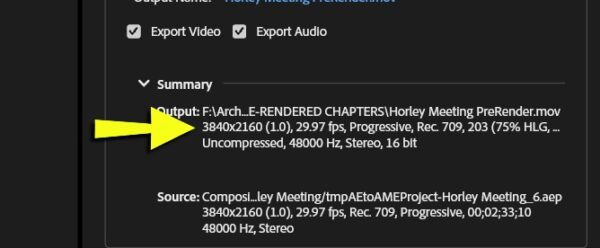
    I am rendering an AE project in Media Encoder, using ProRes422 Codec and before starting the render I check all the parameters. Render size is 3840×2160 (see first image).

    But when I start the render, looking in the preview window, it shows only the frame as a tiny part in the upper left corner of the total frame. I have manually set the size to 3840×2160 AND tried using “Match Source”. Both produce this outcome.

    Here’s what it seems like to me. This only started happening after I set a custom Preview Size (I set it to 1/8 to try to get faster Previews). But why would the Preview size affect the Render Size?

    ISSUE #2:

    When I see the render going wrong and hit “Stop”, instead of just stopping, as it normally would, it initiates a sysem shutdown. I do not have “Auto Computer Shutdown” checked, although stopping a render shouldn’t initiate a system shutdown even if I did.

    These issues persist even after purging and a full restart of the system. Running AE 2025 and rendering out to Media Encoder 2025. I have a modern multi-thread PC with 64GB Ram and running Windows 11 with the latest updates. I have a GeForce RTX 3060 with 12GB video memory with the latest updates.

    Thanks to anyone who might shed some light on these issues.
    Mads Nybo jørgensen
    replied 9 months, 2 weeks ago
    3 Members · 3 Replies
  • 3 Replies
  • Chris Voelz

    August 1, 2025 at 3:39 pm

    What happens when you render straight from AE? I’ve had way too many issues trying to make a master out through Media Encoder. I always do a lossless or ProRes out of AE and then recompress in ME. I’ve also occasionally had hiccups and switching the render engine in ME helps.

  • Daniel Siddall

    August 1, 2025 at 8:17 pm

    I appreciate the reply.

    Yes, I am aware of doing it the way you described, however as I was able to do it through ME just yesterday, it seems like it must be an easy fix or something I am overlooking.

    Looking forward to seeing if anyone else has any insight.

  • Mads Nybo jørgensen

    August 2, 2025 at 6:08 pm

    Hey Daniel,

    Out of interest, in Media Encoder, does it switch the coded to a HD size, or a preset, that can’t do the 4K?

    As weird as it may sound, this thread on Adobe might help you, also involving an NVidia GeForce card (and After Effects CC 2017):

    https://community.adobe.com/t5/after-effects-discussions/after-effects-cc-2017-render-different-from-preview/m-p/9221800

    Atb
    Mads

We use anonymous cookies to give you the best experience we can.
Our Privacy policy | GDPR Policy