Creative Communities of the World Forums

The peer to peer support community for media production professionals.

Activity Forums Adobe After Effects Red Giant TP Shine 2 extend past layer edge in 3d space

  • Red Giant TP Shine 2 extend past layer edge in 3d space

    Posted by Gareth Little on November 16, 2020 at 11:04 pm

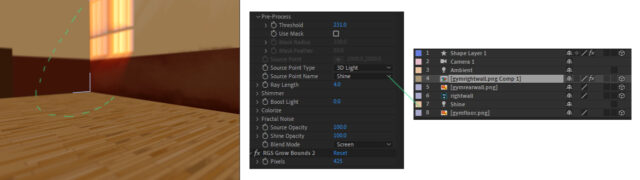
    Have tried the advice from the few posts/videos on this topic but am still struggling to overcome the issue. I’m not sure of exactly where I should be applying the effect within my comp. As suggested in other places I tried pre-comping the target layer and putting the effect on to that. I’ve also seen it mentioned that I should be applying the effect to a null object. The TP shine page just says to link the effect to a light source in AE. I’ve tried all 3 ways but must be missing a vital step somewhere.

    I’m trying to get the light rays to extend past their boundary in 3d space (dotted line in screenshot). I’d really appreciate any pointers, even clarification of where I should be applying the effect so I can concentrate my efforts in the right place.

    Gareth Little replied 5 years, 5 months ago 2 Members · 2 Replies
  • 2 Replies
  • Michael Szalapski

    November 18, 2020 at 6:29 pm

    You shouldn’t be applying Shine to the Gym wall layer. Apply it to an adjustment layer that’s 2d and the full size of the comp. If you have a moving camera, that’s when you need to link the source point to a 3d light, but the adjustment layer remains 2d.

  • Gareth Little

    November 18, 2020 at 7:08 pm

    Perfect, thank you so much, that fixed it immediately! For anyone else struggling through this:

    Make sure your light has the same name as specified in Shine settings (source point name)
    Adjustment layer goes right at the top

    Thanks again, was totally stuck with that.

    Gareth

We use anonymous cookies to give you the best experience we can.
Our Privacy policy | GDPR Policy