Creative Communities of the World Forums

The peer to peer support community for media production professionals.

Activity Forums Adobe After Effects Expressions Randomize color of words in a text layer based on specific color controls effect

  • Randomize color of words in a text layer based on specific color controls effect

    Posted by Sebastien Bruzzo on April 2, 2023 at 12:31 pm

    Hello everyone !

    I’m facing a little problem. I want to randomly change the color of words in a text layer, no need to animate the change of color, but I want the colors to be randomly picked from a list of Color Control effects.

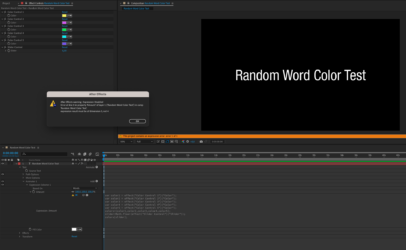
    This expression is working if applied to a color parameter, but – as you can see on the screen capture – when it’s applied to the Expression selector of a text Animator, I get this error.

    “expression result must be of dimension 3 not 4”

    I guess it’s because the value of each variable “var color…” also include the Alpha value.

    Any help would be very welcome, thank you guys.
    Brie Clayton replied 3 years, 4 months ago 3 Members · 5 Replies
  • 5 Replies
  • Dan Ebberts

    April 2, 2023 at 12:45 pm

    If your text is black and the fill color animator is white, this should work:

    color1 = effect("Color Control 1")("Color");
    color2 = effect("Color Control 2")("Color");
    color3 = effect("Color Control 3")("Color");
    color4 = effect("Color Control 4")("Color");
    color5 = effect("Color Control 5")("Color");
    colors = [color1,color2,color3,color4,color5];
    slider = Math.floor(effect("Slider Control")("Slider"));
    c = colors[slider];
    [c[0],c[1],c[2]]*100
  • Sebastien Bruzzo

    April 2, 2023 at 1:11 pm

    Hey hello Dan, and thank you so much for your swift answer ! 😉

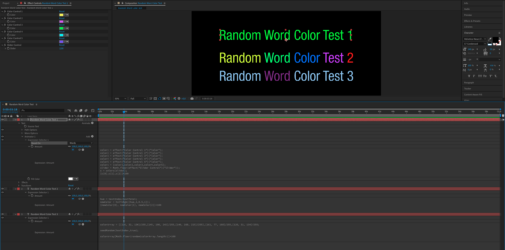
    I just tried and it seems it works on the global color of the text layer, but it’s not changing the words color randomly.

    Here’s a screen capture of the different expressions I’ve found on several websites.

    Many thanks !

  • Dan Ebberts

    April 2, 2023 at 2:04 pm

    Ah, sorry. I got distracted by the slider. Try it this way:

    color1 = effect("Color Control 1")("Color");
    color2 = effect("Color Control 2")("Color");
    color3 = effect("Color Control 3")("Color");
    color4 = effect("Color Control 4")("Color");
    color5 = effect("Color Control 5")("Color");
    colors = [color1,color2,color3,color4,color5];
    seedRandom(textIndex,true);
    i = Math.floor(random(colors.length));
    c = colors[i];
    [c[0],c[1],c[2]]*100
  • Sebastien Bruzzo

    April 2, 2023 at 2:08 pm

    Works like a charm !

    Dan’s magic again 🙂

    Thank you so much !

  • Brie Clayton

    April 2, 2023 at 3:54 pm

    Thank you, Dan!

We use anonymous cookies to give you the best experience we can.
Our Privacy policy | GDPR Policy