Creative Communities of the World Forums

The peer to peer support community for media production professionals.

Activity Forums Maxon Cinema 4D Problem with Joints not working with mesh

  • Problem with Joints not working with mesh

    Posted by Kevin Camin on September 11, 2012 at 4:26 am

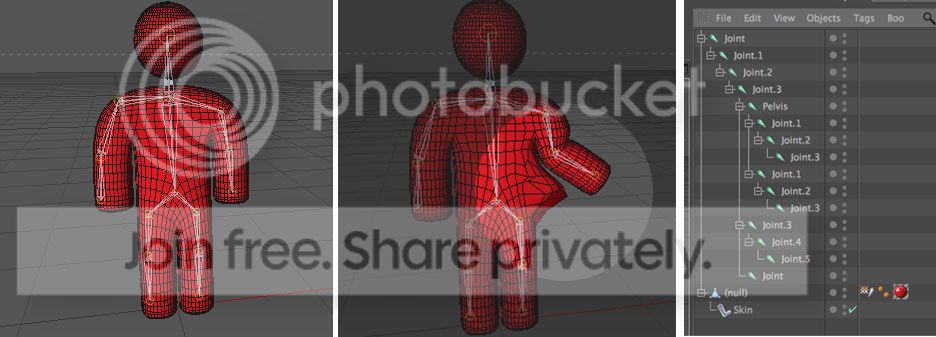
    I’m new to this. But. I set up a simple Joint Tool rig, and then selected everything (mesh and joints) and executed the Bind command.

    The problem is when I rotate or move a joint within an arm or leg, it takes the torso or pelvis along with it. The polygon mesh is cleanly defined, so I’m confused. Please help me if you can.
    Best regards,

    Kevin Camin

    Kevin Camin replied 13 years, 10 months ago 2 Members · 2 Replies
  • 2 Replies
  • Adam Trachtenberg

    September 11, 2012 at 3:05 pm

    Automatic weighting works pretty well, but it generally requires some manual cleanup, as here. You made it tough on the auto-weighter by not putting the figure in a T-pose, which makes it harder to distinguish between body points and arm points.

    Anyway, you’ll need to use the weight tool and/or manager to adjust the joint weights. I would suggest you check the help documents on those tools as it’s a bit complex to explain in a post.

  • Kevin Camin

    September 11, 2012 at 8:49 pm

    Thanks for the help. I bought the model from Turbosquid and it came with its arms at its side.

    The weight tool was the tool I was looking for. Thanks again.

    Best regards,

    Kevin Camin

We use anonymous cookies to give you the best experience we can.
Our Privacy policy | GDPR Policy