Creative Communities of the World Forums

The peer to peer support community for media production professionals.

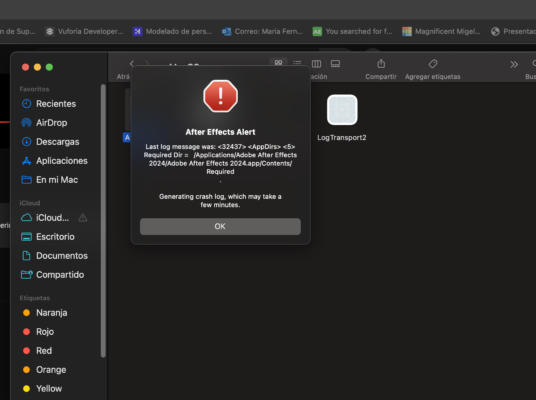
Activity Forums Adobe After Effects Please help!! I closed an AE project for a moment and then this appeared…

  • Please help!! I closed an AE project for a moment and then this appeared…

    Posted by Omar Bateman on July 4, 2024 at 10:02 am

    I don’t know how to solve it, its importante to say I have the Adobe suite cracked

    I AM DESPERATE BECAUSE THIS IS A PROJECT THAT I HAVE BEEN WORKING ON FOR WEEKS AND I MUST HAVE IT READY ON SATURDAY.

    John Cuevas replied 2 years, 1 month ago 3 Members · 5 Replies
  • 5 Replies
  • Hector Vera

    July 4, 2024 at 3:47 pm

    It looks like to me that its a missing file in that directory where its pointing out. Did you remembered at any point if you accidently deleted an important file within like the Adobe folder? Or misplaced a file to another place? I think also using Windows Event Log can give you more information on what caused this error from Adobe After Effects. If it continues, you may have to uninstall and reinstall AE while keeping the .aep files in tact so when you reinstall it, perhaps all the files required to run AE will all be there for you to use. You should get access to your project file afterwards. I hope it helps! 🙂

  • Omar Bateman

    July 4, 2024 at 5:06 pm

    Hello! I’m sure I haven’t deleted anything. I just closed the project I’m working on and when I wanted to open it again the message appeared

  • John Cuevas

    July 4, 2024 at 9:52 pm

    Do you have an auto save folder?

  • Omar Bateman

    July 4, 2024 at 10:09 pm

    yes

  • John Cuevas

    July 8, 2024 at 11:48 am

    You probably already have done this, but just open up the most recent project from the autosave folder.

The discussion ‘Please help!! I closed an AE project for a moment and then this appeared…’ is closed to new replies.

We use anonymous cookies to give you the best experience we can.
Our Privacy policy | GDPR Policy