Creative Communities of the World Forums

The peer to peer support community for media production professionals.

Activity Forums Adobe After Effects pixel/mm ratio for 3D previz

  • pixel/mm ratio for 3D previz

    Posted by Adam Browne on June 20, 2008 at 3:44 pm

    So my question is basically this:

    I can set the focal length of a camera (in mm), so how many pixels equals a millimeter (or inch) in a 3D composition?

    I want to use AE to do some pre-vizualization for a short film. I’ve done a lot of 3D work in AE, but never needed to represent true physical space. So here’s another way of asking the same question: If I take a real picture of a 12″ square with a 35mm lens, how large (in pixels) should my 3D AE square-layer be to match the photo (with my AE camera set to 35mm of course)?

    If you’re out there Dave LaRonde, I get the impression from some of your posts that you know the answer.

    Thanks,
    Adam

    Ifeanyi anyi replied 3 months, 4 weeks ago 3 Members · 5 Replies
  • 5 Replies
  • Adam Browne

    June 20, 2008 at 4:38 pm

    Thanks, Dave. Hmm… I’ve been doing some tests. In the camera settings window, I can select between inches and pixels as units, and when I divide those numbers (regardless of comp size) I get 72 (px/in).

    Unfortunately, I don’t own a camera with prime lenses to test with.

    I’ll try a few more things and report. Maybe there’s other folks out there who could benefit from this knowledge.

  • Adam Browne

    June 20, 2008 at 6:36 pm

    I think I have some answers. Basically, the idea of doing 3D pre-viz in AE works! The pixel-inch ratio is arbitrary, you just need to be consistent. Check out this test:

    I used my HVX at it’s widest setting (=32.5mm lens) to take a shot of some walls in my apartment. I picked a point in the room to be my ZERO point (x=0, y=0, z=0) and then I measured EVERYTHING (mostly importantly, camera placement/angle). I drew up some sketches of the walls (to scale) and brought it all into After Effects. For this test I made 1 ft = 72 px.

    I set-up everything in the compostition by the measurements I made in the real world, and this is the result.

  • Adam Browne

    June 20, 2008 at 8:20 pm

    I thought the same thing about the “72” coincidence, so I rescaled the images in PhotoShop and did it again with 1 ft = 100px, and it looked exactly the same. So it seems to be arbitrary, as long as I’m consistent.

    If anyone else tries this, I recommend using the ratio 1ft = 100px. The file sizes are manageable, and the conversion is very simple. For example, if my AE camera is 600px away from the subject, I know to put my real camera 6 ft away.

  • Mike Sevigny

    January 14, 2026 at 6:19 pm

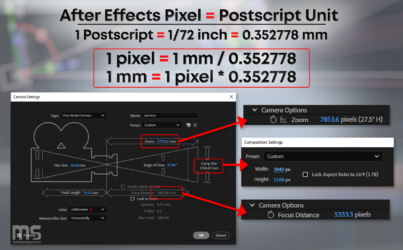
    In case anyone is interested, I made a graphic to show the pixel/mm relationship

  • Ifeanyi anyi

    January 15, 2026 at 10:51 pm

    For 3D pre-viz in After Effects, the pixel-to-mm (or inch) ratio is arbitrary as long as you stay consistent. I usually pick a scale that’s easy to work with, like 1 ft = 100 px. Then I match my AE camera distance proportionally to the real-world measurements. This keeps everything to scale without worrying about exact mm-to-pixel conversion.

We use anonymous cookies to give you the best experience we can.
Our Privacy policy | GDPR Policy