

-

Tim Wilson
September 13, 2020 at 10:52 pmAnd to finish answering the question about uploading video, you can of course use your favorite hosting service to uplaod the video to, and then embed it in the COW. I’m using imgur more and more these days, but your mileage will vary…
-

John Bolton
September 14, 2020 at 4:19 pmWell here goes. Jono asked the question and like others looked into the issue with DCC page roll
I am not sure if this is what he was looking for but this is the best I have discovered so far.
If it is not what’s wanted then NP.
If it is what is wanted that I will produce a Tut or it.
There are 2 variants in this video as it plays…..
Let me know
<font face=”inherit” style=”font-family: inherit; font-size: inherit;”>I am hoping that the Youtube </font>Link<font face=”inherit” style=”font-family: inherit; font-size: inherit;”> works</font>
https://www.youtube.com/watch?v=CiC0NeLADVE
John
Some contents or functionalities here are not available due to your cookie preferences!This happens because the functionality/content marked as “Google Youtube” uses cookies that you choosed to keep disabled. In order to view this content or use this functionality, please enable cookies: click here to open your cookie preferences.
-

Francois Pénzes
September 14, 2020 at 7:17 pmHi John !
How did you pull that on off ?
(the first one)
Cheers !
-
John Bolton
September 15, 2020 at 7:59 amHi Francois
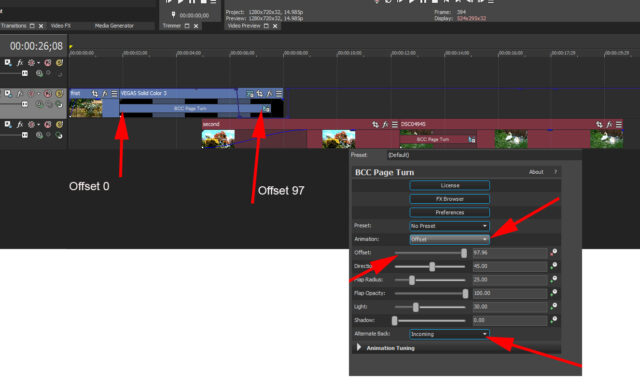
After much experimenting, I then found out that the “Standard Page Turn FX” cannot work in Vegas as within a normal effect it cannot access secondary layers unless you can add it as a Custom Compositing Mode, but it does not appear if you click on custom.
So the only way is to add it as a “Transition” and make your selection in there. So just drop the “Page Turn Transition” effect where each Media joins and then make the relevant adjustments.
You have to Change the “Animation” control from “Auto to Offset” else the Offset slider will be greyed out and then change the “Alternate back” to “incoming” which means that it will add the following image to the back of the previous one. If you select” Outgoing” you get the first Image on the reverse.
Hope some of this makes sense 🙂
I only did a quick experiment, so with more time no doubt it could be drastically improved.
Hope the Picture helps,
Regards

-
John Bolton
September 16, 2020 at 4:13 pmHad another play…
https://www.youtube.com/watch?v=x5E_G0yeKbg
Think this may be a better way to do it..
Some contents or functionalities here are not available due to your cookie preferences!This happens because the functionality/content marked as “Google Youtube” uses cookies that you choosed to keep disabled. In order to view this content or use this functionality, please enable cookies: click here to open your cookie preferences.
-
Tim Wilson
October 10, 2020 at 7:26 pmHey folks, chiming in here with a small feature update! We’ve just added file upload to the forums, which will work for things like project files, as well as a bunch of other stuff: PDF, PPT, disk images, PSD, Illustrator, what have you — dozens of formats in all, most with previews where applicable, with more coming.
And for any of your favorite file types not covered yet, you can pop ’em in a zip file, which is already supported.
You can find the file uploader in the toolbar of the text entry window, between image upload and emojis.

Among the file types supported is MP4, but only as a file type. That is, there’s no player attached to this just yet.
The reason that this hadn’t been enabled in the old COW for the past few years is that it’s a harder feature to develop and maintain than it appears. There’s a bunch of back-end stuff related to encoding if you’re going to do it right, which is also why it will take a bit longer for us to reintroduce here.
 On the roadmap, though!
In the meantime, far more than YouTube is supported for videos in forum posts! I’ve tested and confirmed Vimeo, Dailymotion, imgur, and Facebook so far myself, and the feature set is identical: paste the URL in your post, and when you publish the post, we handle the embed for you. Very neat and clean!
More coming soon!
Thanks again,
Tim Wilson
Editor-in-Chief
Creative COW

Reply to this Discussion! Login or Sign Up