Creative Communities of the World Forums

The peer to peer support community for media production professionals.

Activity Forums Adobe After Effects “Output To”

  • Andrzej Goulding

    July 16, 2022 at 10:22 am

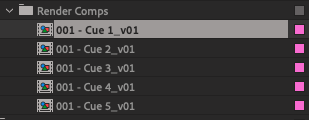
    I should also say that the “_v01” ending to the file is required by the media server it’s going onto so that formatting has to stay, you can just increase the number after the “v”.

    Cheers

  • Martin Sautter

    July 18, 2022 at 8:54 am

    This normally happens when the file already exists or the name was already used in the render queue. Did you try using Media Encoder or rendering to another directory?

  • Andrzej Goulding

    July 18, 2022 at 10:14 am

    Hi there.

    Yes I’m aware it does that and rendering to another directory isn’t what I need. I need it to be in the same directory but versioned up. I’m hoping there’s a automated way to achieve this like you would din say C4D. I can see on the “Output To” you can put in a bunch of strings, etc… for file naming but there isn’t one to apply to versioning as far as I can tell. I’m no good with code, but are there strings that can be put in that aren’t the ones listed that would work?

    If I have to change the file names 150 times every time I want to make an update I’ll have to do that, just seems a bit tedious if there is a coding way around that is all.

    Cheers

  • Walter Soyka

    July 18, 2022 at 1:24 pm

    A couple approaches:

    1. Use a renaming tool in Ae to find “_v01” and replace with “_v02”. I still use Chris Green’s Project_Item_Renamer script for this, but there are also several on aescripts.com.

    2. Duplicate the comp before you make your changes (Ae will then automatically rename MYGREATCOMP_v01 to MYGREATCOMP_v02 instead of MYGREATCOMP_v01_1). Personally I think this is better version control anyway, because your filenames will match your comp names.

  • Andrzej Goulding

    July 18, 2022 at 2:33 pm

    Ah lovely. Yes that is a couple of good ways to do it. Thanks v much.

We use anonymous cookies to give you the best experience we can.
Our Privacy policy | GDPR Policy