

Activity › Forums › Apple Final Cut Pro Legacy › Nobody knows the answer to this fcp problem
-
Nobody knows the answer to this fcp problem
Posted by Seth Newell on February 20, 2009 at 12:31 amI put a 3way color correct filter on a clip, adjusted till it looked good. Then I exported uncompressed and the clip with the filter on it looked very washed out like when you turn the contrast wy down on a clip.
Any ideas?
Tarquin Boyesen replied 14 years, 1 month ago 7 Members · 12 Replies -
12 Replies
-

Shane Ross
February 20, 2009 at 1:17 amViewing this just with Quicktime? Or how?
Shane

GETTING ORGANIZED WITH FINAL CUT PRO DVD…don’t miss it.
Read my blog, Little Frog in High Def -

Matt Devino
February 20, 2009 at 2:16 amWhat kind of footage are you working with? What are your sequence settings? Are your timeline render options set to 8-bit, 10-bit YUV, or RGB? Are you exporting a quicktime using “quicktime conversion” or did you render an uncompressed sequence then just export that using the normal “export quicktime movie?”
-

Arnie Schlissel
February 20, 2009 at 2:55 am[Seth newell] “adjusted till it looked good.”
Looked good on what? Your properly calibrated broadcast reference monitor? The no-name monitor that was on sale at Wal-Mart?
And were you watching your video scopes to make sure that you were getting the best range of contrast, that you were inside the gamut of your video standard?
Arnie
Post production is not an afterthought!
https://www.arniepix.com/ -

Seth Newell
February 20, 2009 at 5:25 amVlC player Quicktime and when I pull the exported uncompressed video back into fcp
-
Seth Newell
February 20, 2009 at 5:29 am1.dvcpro HD footage
2.YUV 8-bit
3. I exported an uncompressed version and that looked awful
-
Seth Newell
February 20, 2009 at 5:39 amLooked good on what? Your properly calibrated broadcast reference monitor? The no-name monitor that was on sale at Wal-Mart?
And were you watching your video scopes to make sure that you were getting the best range of contrast, that you were inside the gamut of your video standard?
Arnie
I have a macpro and I dont have a lot of experience with the scopes but
I think they were in the gamut.But if it looks good in fcp why would it change at all if you sent it out uncompress even if it was a crappy monitor or the scopes where bad?
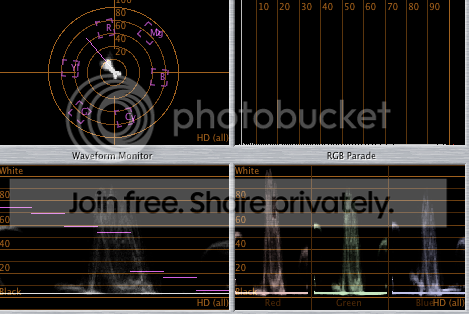
here is a picture of the footage and my scopes the picture on the left is after uncompressed 8 bit quicktime export the rightside is in fcp before export.

-

Gary Adcock
February 20, 2009 at 3:02 pm[Seth newell] “I put a 3way color correct filter on a clip, adjusted till it looked good. Then I exported uncompressed and the clip with the filter on it looked very washed out like when you turn the contrast wy down on a clip. “
Well there are 2 possibilities I can think of and both assume some kind of operator error.
1) wrong clip was selected in the timeline when the filter was applied, this is by far the most common error when the output does not match the input.
2) the clip was not rendered prior to the QT output- in a file based workflow the clip must be rendered for the QT component to properly send the rendered info to the new file- this cannot be done without a full file render and then save.
gary adcock
Studio37
HD & Film Consultation
Post and Production WorkflowsInside look at the IoHD
https://library.creativecow.net/articles/adcock_gary/AJAIOHD.php -

Jeremy Garchow
February 20, 2009 at 4:55 pm[Seth newell] “3. I exported an uncompressed version and that looked awful”
And I bet you used Quicktime Conversion for that, right? Simply export a QT movie from FCP (not QT Conversion) and do any transcoding in Compressor.
Jeremy


Reply to this Discussion! Login or Sign Up