

-
Newbie question about the Premiere CC timeline
Dear people!
I used to cut my videos with Premiere 6 (from the 1990ies :-)). Therefrom I am used to carefreely drag and drop the clips in the timeline from one track to the other — WITHOUT any overwriting of video or audio tracks.
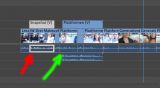
Now, working with Premiere CC, I find them to be overwriting the audio track instead of placing them in another track. Why the h*** does it do that??
Is there a save way to permanently deactivate this “feature”? (Which would be a lot better to me than having to press any Strg/Ctrl/Alt-Buttons always when dragging the clips around.)I uploaded a picture of what I mean. Red is what it does. Green is what it should be for me.
Thank you!


