Creative Communities of the World Forums

The peer to peer support community for media production professionals.

Activity Forums Adobe After Effects My render looks lighter when previewed in Quicktime player.

  • My render looks lighter when previewed in Quicktime player.

    Posted by Kevin Camin on March 22, 2011 at 4:39 pm

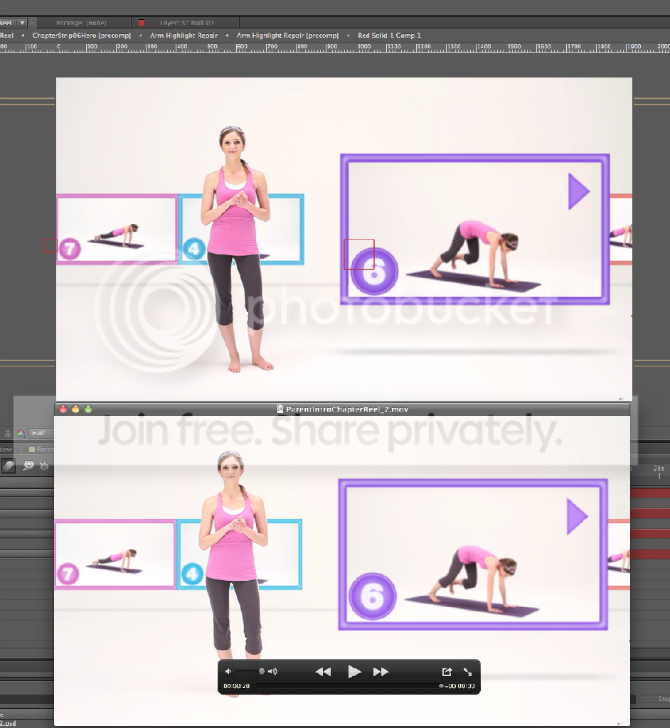
    My render looks considerably lighter when viewed inside the Quicktime player. I have my project color managed; the Working Space set to HDTV Rec. 709, and my export settings match that profile.

    As a test I reimported the render back into AE and it looks fine. Why is Quicktime player producing a lighter image? Or is something screwed up in AE?

    The top image is from inside AE. The bottom is from Quicktime. You can really see the difference in her pants legs.
    Kevin Camin replied 15 years, 4 months ago 3 Members · 4 Replies
  • 4 Replies
  • Erik Waluska

    March 22, 2011 at 5:38 pm

    If your video is encoded with H.264 then it could be the notorious Quicktime gamma shift. Check this article on Video Copilot for a fix:
    https://www.videocopilot.net/blog/2008/06/fix-quicktime-gamma-shift/

  • Kevin Camin

    March 22, 2011 at 5:58 pm

    Thanks for the link.

    But no, it is rendered in the animation codec.

  • Walter Soyka

    March 22, 2011 at 6:35 pm

    That’s just QuickTime being QuickTime. Its color management is a mess, and color and gamma are always a moving target.

    Trust what you see in AE with color management (and on an external video monitor), not what you see in QuickTime Player.

    Walter Soyka
    Principal & Designer at Keen Live
    Motion Graphics, Widescreen Events, Presentation Design, and Consulting
    RenderBreak Blog – What I’m thinking when my workstation’s thinking
    Creative Cow Forum Host: Live & Stage Events

  • Kevin Camin

    March 23, 2011 at 12:12 am

    Thanks, Walter. That is reassuring.

We use anonymous cookies to give you the best experience we can.
Our Privacy policy | GDPR Policy