Creative Communities of the World Forums

The peer to peer support community for media production professionals.

Activity Forums Adobe After Effects MOCHA PRO – TIFS and PNGS COMING IN WRONG

  • MOCHA PRO – TIFS and PNGS COMING IN WRONG

    Posted by Josh Mannis on April 25, 2024 at 11:18 pm

    Hi all –

    I’m in Mocha Pro in After Effects 2023 and have run into another annoying wall.

    The project I’m working on has me using the power mesh to track on a little patch to hide the edge of a malfunctioning prosthetic nose.

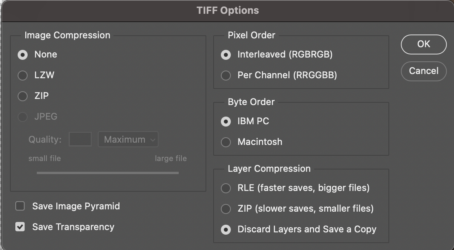
    I’m using the Insert Module to do this, but when I bring my patch as a .tiff from photoshop, I get this message: “Failed to read image…” I can get a .png to work, but for some reason it comes in darker than the raw footage.

    In either case, are there particular settings I need to do before leaving photoshop, or when importing into mocha?

    Thanks a mil!

    -Josh

    After Effects 2024

    3 GHz 10-Core Intel Xeon WRadeon Pro Vega 64 16 GB28 GB 2666 MHz DDR4

    Eric Santiago replied 2 years ago 3 Members · 8 Replies
  • 8 Replies
  • Hector Vera

    April 29, 2024 at 3:19 pm

    That is pretty strange indeed. I remember this happening to me before in the past where I import a PNG image and it comes darker and looks glitchy. Sometimes there could be something wrong in the file format as well. Have you tried closing After Effects fully (including End Task on task manager) and then reopen it to see if the results are different? Hope to hear from you soon.

  • Eric Santiago

    April 29, 2024 at 3:44 pm

    Check the TIFFs formatting.

    Is it a base TIFF with no LZW compression?
    I cant see why it would be but where did this image derive from?
    Is it CMYK or RGB?

    All those come to factor.

  • Josh Mannis

    April 29, 2024 at 7:36 pm
  • Josh Mannis

    April 29, 2024 at 9:37 pm

    Hi Hector,

    restarting AE / ending task doesn’t work, but thanks for the suggestion. In terms of problems in the file format – what should I be looking for?

    Thanks,

    -j

  • Eric Santiago

    April 29, 2024 at 10:23 pm

    The settings are good but is it RGB?

  • Josh Mannis

    April 29, 2024 at 10:25 pm

    Yes – it is RGB. Is that right or wrong?

  • Hector Vera

    April 30, 2024 at 3:16 pm

    Try converting the current file format of that glitched file to another one that is also supported by AE. Have you tried opening the file normally outside of AE?

  • Eric Santiago

    April 30, 2024 at 11:37 pm

    Just checking to see if the file is suspect.

    It should be RGB and not sure if Mocha cares for LZW compressed files.

    I tend to convert the file to something like PSD when I run into these oddities.

We use anonymous cookies to give you the best experience we can.
Our Privacy policy | GDPR Policy