Creative Communities of the World Forums

The peer to peer support community for media production professionals.

Activity Forums Adobe After Effects Mask to reveal entire object when majority of object is covered

  • Mask to reveal entire object when majority of object is covered

    Posted by Kalle Persson on August 8, 2025 at 7:39 am

    I got this composition with multiple individual squares. I would like to reveal the squares as pixelated clusters.

    Right now i’ve got a circle as a mask (track matte – alpha matte), for each square. But instead of each square being revealed gradually by the outer edge of the circle. I would like to make each square appear instantly as soon as the mask has covered the majority of a square. In that way i can distort the circle to create irregular clusters.

    Kalle Persson replied 9 months, 1 week ago 2 Members · 2 Replies
  • 2 Replies
  • Graham Quince

    August 8, 2025 at 7:59 am

    Hi Emil,

    I think I’d go about this by precomposing my circular mask layer. Then use the Mosaic effect to “blockify” it so that each block matches the size of the squares. As the mask expands, the mosaic effect will snap appear each block.

  • Kalle Persson

    August 8, 2025 at 8:27 am

    Hi Graham,

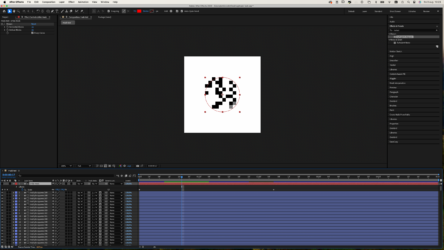
    That seems to work really good! Do you know a way to completly eliminate does “soft” transitions with mosaic. Applied it here with “sharp colors” but there still seem to be some “soft reveals” as you can se in the attached screenshot.

We use anonymous cookies to give you the best experience we can.
Our Privacy policy | GDPR Policy