Creative Communities of the World Forums

The peer to peer support community for media production professionals.

Activity Forums Adobe After Effects Mac Collected Project Issues on Windows

  • Mac Collected Project Issues on Windows

    Posted by William Saviola on September 30, 2020 at 6:48 pm

    I am on the most recent AE 2020.

    I have been getting projects being collected from Macs. (All running latest AE)

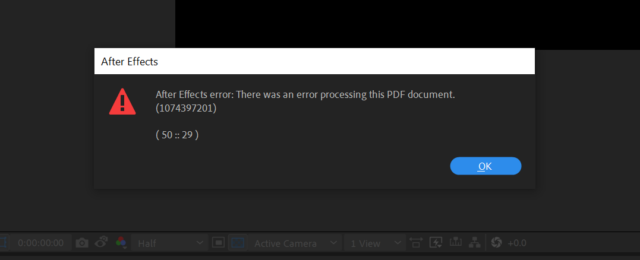
    When I come to open them on my Windows machine I get the error attached.

    The other issue is the naming convention plays a part. If the project collected on the mac has long file names, AE on Windows is unable to link it in the project and says its:

    ‘Corrupted’ in an error’ or ‘unable to open the specific file’

    Scrubbing through the timeline then causes AE to crash.

    This has been causing me serious issues as the last three projects I have worked on were all projects were collected from a Mac and sent over to me.

    There seems to be nothing online about it. Does anyone know anything about this or had a similar issue?

    Thanks.

    William Saviola replied 5 years, 7 months ago 4 Members · 6 Replies
  • 6 Replies
  • Bret Hampton

    September 30, 2020 at 8:40 pm

    Sometimes Mac filenames don’t place nice with Windows. Mac users are often used to making up filenames with symbols Windows can’t read.

    The way many people deal with this is always use this naming convention on either OS. This insures both can open/save files

    Program_Date_Job_Part_1

    Very simple, never leave blank spaces. Always separate words with underscore. Numbers only, no symbols.

    Try duplicating a questionable file, then renaming it as above to test.

  • William Saviola

    September 30, 2020 at 8:52 pm

    Thanks Bret.

    All good points. Unfortunately, this is just impossible when the project is huge with tons of imported projects within a project.

    So from your experience, the only way to try to fix the issue is to go and rename certain files that may be too long or have symbols etc In them.

    I did that today and the project still continued to crash and not let me work init.

    Just seems ridiculous there is no other way to stop this.

  • Eric Santiago

    September 30, 2020 at 11:59 pm

    Have you checked if the PDFs are in CMYK?

    AE does not like that format.

    Must always be RGB.

    I could be wrong, that issue was an old one.

  • Daniel Griffin

    October 5, 2020 at 5:22 pm

    I had the same problem a couple weeks ago. I almost had a heart attack. Renaming the files to shorter names and replacing them in the project helped me save the project. There is software to rename multiple filenames, I’ve used Name Mangler in the past https://manytricks.com/namemangler/

  • Eric Santiago

    October 5, 2020 at 7:13 pm

    Did you also get a report txt file from the Consolidated/Collected projects?

    Open it in notepad and do a search for *.pdf.

    You can do the same in Windows Exploder and weed out the PDFs to see if any have odd naming practices.

    Could be soup to nuts with that error your getting 😛

  • William Saviola

    October 5, 2020 at 7:28 pm

    Some excellent advice.

    Thank you all!

We use anonymous cookies to give you the best experience we can.
Our Privacy policy | GDPR Policy