

Activity › Forums › Adobe After Effects › Lighting effect looks great in After but terrible in Premiere!
-
Lighting effect looks great in After but terrible in Premiere!
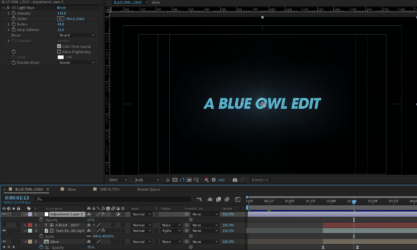
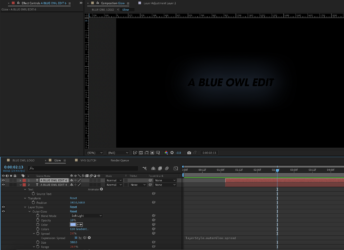
Posted by Lee Pines on February 2, 2024 at 1:54 pmI have this lighting effect on my logo in after effects and I get it just the way I want it, but when I bring it into premiere, it looks way too bright and pixelated. When I export it through after effects, I get the same result. There are two screenshots, the first is After, the second is Premiere.
How do I get it to look right in premiere?
 Eric Santiago replied 2 years, 7 months ago 4 Members · 7 Replies
 -
7 Replies


-

Tom Morton
February 2, 2024 at 2:11 pmDifficult to help when we don’t know anything about what’s going on, all you’ve given us is 2 images… really need some more details.
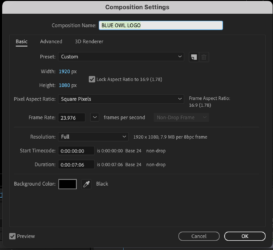
Can you post some screenshots of the After Effects projects and how the effect is built? What machine are you editing on, what’s the OS, and what GPU?
What export settings did you use in After Effects? Have you tried rendering with different settings, different codecs or the like?
-

Eric Santiago
February 2, 2024 at 2:22 pmYour AE is either set to 16bit and/or Premiere don’t support the bpc.
Is this a final render or view screen?
-

Andy Kiernan
February 2, 2024 at 2:43 pmif a glow isnt working right in NLE, its usually the alpha setting i find, pre-mult and all that jazz. Try changing the way prem handles the clips alpha.
-

Lee Pines
February 2, 2024 at 2:56 pmYes, sorry! I wasn’t sure what info to give.
The effect is an outerglow on text with CC light rays in an adjustment layer.
I’m using a Macbook M3.
I managed to render the project in After and the .mov looks correct. But rendering as an mp4 didn’t work. So i think it may have to do with the alpha as another commenter suggested. But I don’t know how to adjust the project so that it looks right in premiere
-
Lee Pines
February 2, 2024 at 2:57 pmHow do I change this setting? I’m not sure I see what you’re referring to exactly
-
Andy Kiernan
February 2, 2024 at 3:01 pmTo change the alpha interpretation in Prem, just right-click the clip in the project bin, go to modify, and select interpret footage. At the bottom of the window there will be some options to change
-
Eric Santiago
February 2, 2024 at 3:04 pmYea kinda hard to help when were not given all that info.
I dont like using any alpha clips outside of AE these days.
If I can avoid it, I will.
Reply to this Discussion! Login or Sign Up