Creative Communities of the World Forums

The peer to peer support community for media production professionals.

Activity Forums Adobe After Effects Layer In & Out Time Automation

  • Layer In & Out Time Automation

    Posted by Gary Sweeney on May 12, 2023 at 12:38 pm

    Hi, just wondering if it’s possible to set the In & Out time of a text layer based on another layer?

    For e.g.

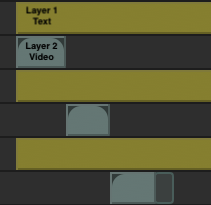
    Layer 1 is a text layer and layer 2 is a video layer.

    Rather than having to manually adjust the ends of the text layer using ‘ option & [ ‘ & ‘ option & ] ‘ I’d like layer 1 to automatically adjust to layer 2.

    In the image below, the yellow text layers would automatically adjust in length to the aqua video layers.

    Gary Sweeney replied 3 years, 2 months ago 2 Members · 2 Replies
  • 2 Replies
  • Andy Kiernan

    May 12, 2023 at 1:58 pm

    my idea was to use parenting and script, so the child matches the parents out point.

    This may help you or may not go far enough, but here you are anyway.

    Im no coder so i cheated and used Chatgpt!

    (cant upload jsx apparently so if you want it, when you download rename it and change .txt to .jsx

    select the parent and child, then run the script.

  • Gary Sweeney

    May 19, 2023 at 11:18 am

    Hi Andy, this worked perfectly, thank you!

    I was able to tweak what you had in the file to do both the in & out times using the script below.

    // Get the selected parent and child layers

    var parentLayer = app.project.activeItem.selectedLayers[0];

    var childLayer = app.project.activeItem.selectedLayers[1];

    // Check if both layers are selected

    if (parentLayer != null && childLayer != null) {

    // Set the in point and out point of the child layer to match the parent layer

    childLayer.inPoint = parentLayer.inPoint;

    childLayer.outPoint = parentLayer.outPoint;

    }


    Then I was able to edit the script to look down through a mass selection and sequence through the layers to run the script multiple times using the script below.

    // Get the selected layers

    var selectedLayers = app.project.activeItem.selectedLayers;

    // Check if there are at least two layers selected

    if (selectedLayers.length >= 2) {

    // Loop through the selected layers in pairs

    for (var i = 1; i < selectedLayers.length; i += 2) {

    var parentLayer = selectedLayers[i];

    var childLayer = selectedLayers[i – 1];

    // Set the in point and out point of the child layer to match the parent layer

    childLayer.inPoint = parentLayer.inPoint;

    childLayer.outPoint = parentLayer.outPoint;

    }

    Thanks for sending me down the right path and saving me a lot of time.

We use anonymous cookies to give you the best experience we can.
Our Privacy policy | GDPR Policy