

Activity › Forums › Adobe After Effects › How to make James Bond Gun Barrel?
-
How to make James Bond Gun Barrel?
Posted by Scott Mayzee on November 22, 2006 at 11:51 pmHey guys, for my next project i am making a james bond spoof. Basically, i am clueless on how to make the gun barrel for the intro scene. Basically if you check out the gun barrel by going to google images and typing “007 gun barrel” and go to the first link, i need help with the following:
How to make the spiral effect on a solid, with a hole in the middle so that the video clip is shown
and
How to make it so that it is shinny, reflective from the video and reacts to light. (If you see the gun barrel image, you will see.Thanks all.
Randy’s replied 19 years, 8 months ago 10 Members · 11 Replies -
11 Replies
-

Mike Clasby
November 23, 2006 at 3:46 amHey, something else I always wanted to do, just didn’t know it until you asked the question. Here’s my solution:
A precomp with Venetian Blinds for the lines (rotated), Radial Shadow for the white edging, masks on a dup layer for the shiny pattern, footage on top with reduced transparency.
Main comp with the precomp and CC Cylinder, looking down the barrel. with footage underneath. The black solid is there only to provide the black outline at the barrel mouth.
Here are pics showing the final and comps.
Tweak away to get the exact look you want.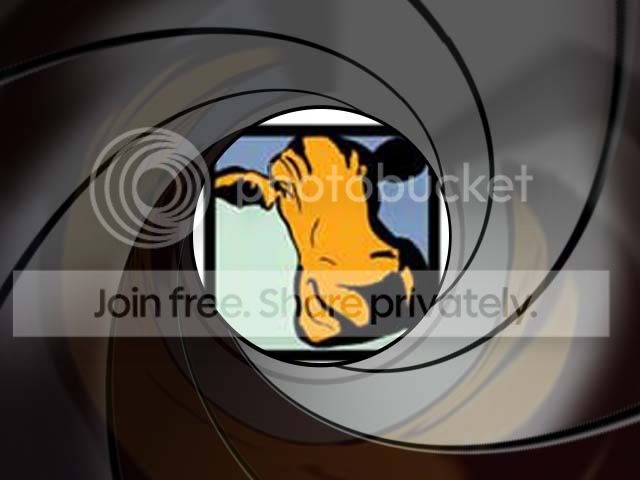
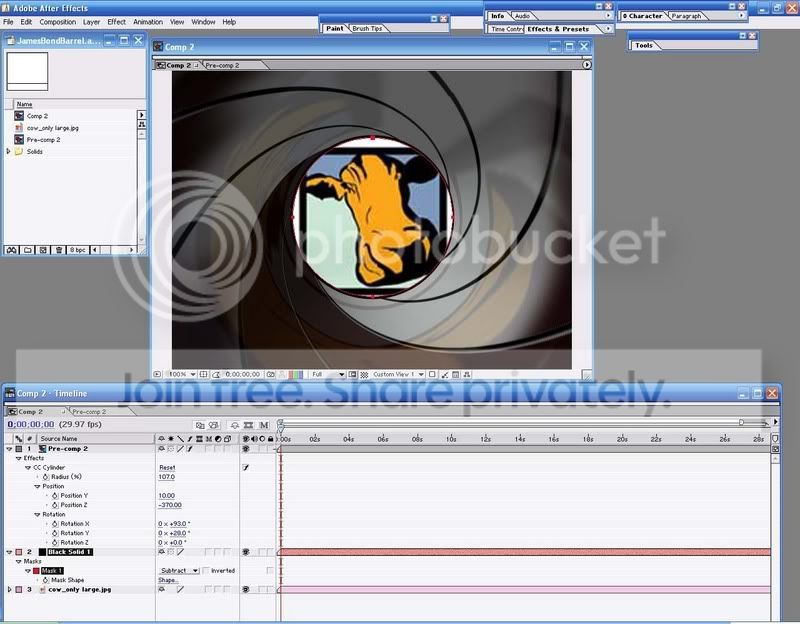
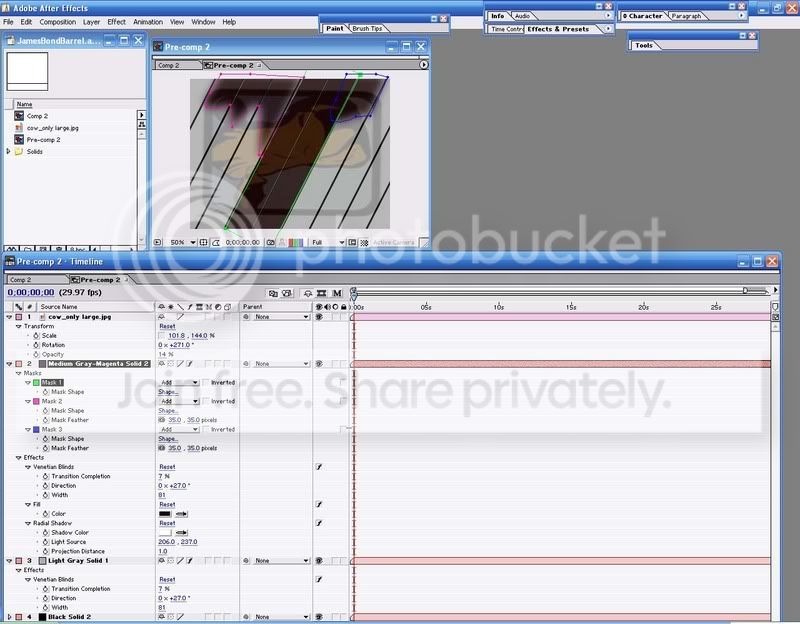
Again, thanks for asking the question, I know I’ll use this sometime.
-

Julian Sixx
November 23, 2006 at 4:45 pmHi
nice one Yikesmikesone question though.Which size did you make your precomp+Comp2?
I don’t get a clean result with CC Cylinder
THX -

Derrick
November 23, 2006 at 5:53 pmHi there yikesmikes,
Please give us a bit more detail on your steps, please?
thanks,
Derrick -
Mike Clasby
November 23, 2006 at 5:59 pmBoth are the preset, NTSC 640×480 Square Pixels. I dunno why I choose that, it seems a convenient size when I’m working things out.
The angle for “Direction” in Venetian Blinds in Pre-comp2 needs to be tweaked to line things up in Comp2. Maybe a different angle will make them align for a different preset (like in a .9 pixel comp). That was my second attempt (hence Comp2) the first time I drew the diagonal lines with Paint, but had a problem getting even spacing and the seams to match, but Venetian Blinds gave a seamless match if that angle for direction is right.
I think the reflection in the barrel needs to be rotated or corner pinned or something, I need to look down a shiny tube to see what it really does. Glad you liked it.
-
Mike Clasby
November 23, 2006 at 7:08 pmI changed my NTSC 640×480 Square Pixels Comps to NTSC DV 720×480 D1 and sure enough
The angle for “Direction” in Venetian Blinds needed to be tweaked to 28.5.To adjust the Venetian Blinds>Direction (Angle) it’s easiest to pull the Comp 2 off to the side to form it’s own comp window, then when you tweak the Venetian Blinds>Direction (in the preComp) you can see when it aligns the seams (the one rifling that was off now matches). This extra window for comp 2 also helps when you move the Radial Shadows Light Source around (in Pre-Comp2, layer 2), move that sucker around until you get the ridges the way you want.
Layer 3, the lighter part of the barrel, carrying the reflection, the Light Gray Solid 2, is 172, 172, 172. It was created first, I added the Venetian Blinds at an angle (Direction) to give the rifling a twist. I then duplicated it for the darker part of the barrel.
Layer 2, the Dark part of the barrel (almost black) Medium Gray-Magenta Solid 2, the comp color is 70,51,70 and the effect Fill is 28,7,8. Actually you don’t need the Fill effect if you change the comp color to 28,7,8. I was winging it and Fill was fast at the time, but is unnecessary if the solid is the right color. The masks are to give the darker part its irregular shape.
The Black solid is only there to fill in the rifling grooves made with the Venetian Blinds, the Venetian Blinds are transparent in the grooves.
Hope this makes sense. It’s funny because I only posted the pics because I thought my explanation would be inadequate (and it may be still). Maybe I need to clean this up and make a tut out of it, yikes.
-

Justin Productions
November 23, 2006 at 10:34 pm[yikesmikes] “Maybe I need to clean this up and make a tut out of it, yikes.”
Would be great!
Justin Productions
Tangerin01@hotmail.com
Adobe After Effects 6.5 Professional -
Dotan Baytman
November 24, 2006 at 2:39 pmYeah a tutorial would be great
always good to have a new tutorial LOL -
Johnmusic992648
November 24, 2006 at 6:05 pmYes, I too would absolutely LOVE to have a tutorial on this subject. I’m a filmmaker, and very familiar with Premiere Pro and Photoshop, but not nearly as experienced as I should be with After Effects or any other effects program. I love what you got so far, but reading how you did it is like reading a Stereo Manual in Japanese…and that’s absolutely no fault of your own lol.
-

Simmizi
December 1, 2006 at 7:58 pmhere’s what i’ve got:
https://home.arcor.de/becker.fam/gunbarrel.jpg
@yikesmikes
what did you do to get such smooth reflection inside the barrel?
i’ve got the problem that at the place where the end of the image come up..there’s a hard contrast…i used the same colors as you wrote but my barrel looks totally different…did you use other blending modes or what is wrong?
Reply to this Discussion! Login or Sign Up