

-
How to change the "velocity" of the ease() function — for advanced users
Usually, I try to limit as much as possible the number of keyframes in my project, so I have to use the linear() and ease() function a lot.
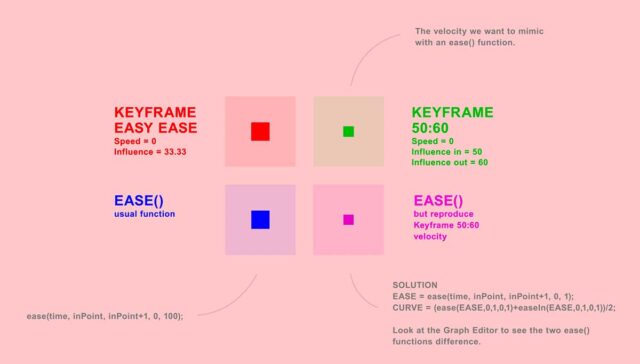
BUT, the velocity of the ease function is fixed (for info, it’s the same as the one of the “easy ease keyframes”, namely an “Incoming and Outcoming Velocity of Speed=0 and Influence=33.33”, and it’s very close of a sinusoid.
Personally, I prefer using a velocity of “50:60” on my keyframes (incoming velocity : speed=0 & influence=50 / outcoming Velocity : speed=0 & influence=60).
So I tried to find a solution to mimic a “50:60 keyframes velocity look” with an ease function.
— — —
And I’ve found this solution that I wanted to share with the community.
In summary, here is the expression that mimic the “50:60 keyframe velocity look”.
EASE = ease(time, inPoint, inPoint+1, 0, 1);
CURVE = (ease(EASE,0,1,0,1)+easeIn(EASE,0,1,0,1))/2;
RESULT = linear(CURVE,0,1,0,100);
To know more, you can download and check this AE project.
https://github.com/jybedesign/after-effects-change-ease-function-velocity— — —
If you’re still reading this, it probably means that you’re quite good with AE expressions. So, I got a question for you.
=> Do you know any other ways to “change the velocity of the ease function” ?
Robert Penner proposed an amazing home-made solution:
http://robertpenner.com/easing/
https://creativecow.net/forums/thread/better-than-ease/#post-2410781But the problem is that his solution is “symetrical”, meaning you can create a 50:50 velocity, but not a 50:60 for example.
If you know more about this, I’m really interested to consider your solution. I tried some solution with trigonometry (some sinus sum), but I’m not sure that it would be really efficient to calculate tons of sinus each frame.
— — —
Anyway, I hope this solution can help. If you think you can improve my code or propose alternative solutions, I’ll be pleased to read you 🙂

Sorry, there were no replies found.