Creative Communities of the World Forums

The peer to peer support community for media production professionals.

Activity Forums Apple Final Cut Pro How do I sort AVC-Intra clips w/FCPX?

  • How do I sort AVC-Intra clips w/FCPX?

    Posted by Dave Hall on August 18, 2015 at 3:06 pm

    I have to start by saying I do not use FCPX, but I am asking for the guy who I work for who cannot seem to sort my AVC-Intra 100 clips with his FCPX. In Premiere I sort the clips in the bin by timecode, which puts them in the order they were shot, but my friend says that is not an option in FCPX… so my clips are all out of sequence when he puts them on a timeline. i spent a while Googling this, but have not found an answer.

    Craig Alan replied 10 years, 9 months ago 4 Members · 5 Replies
  • 5 Replies
  • Noah Kadner

    August 18, 2015 at 3:55 pm

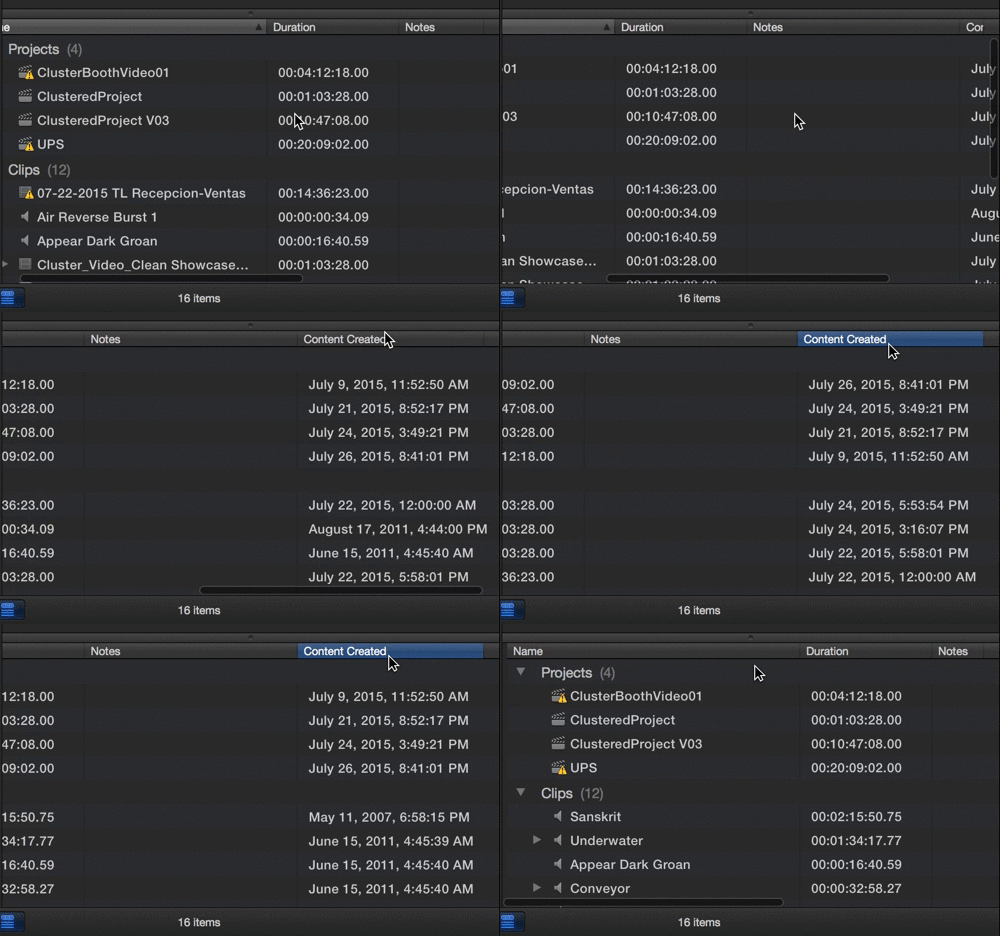
    Most columns within an FCPX event- i.e. where you source media lives can be used to sort by- pretty much like any app.

    Noah

    FCPWORKS – FCPX Workflow
    Call Box Training

  • Bill Davis

    August 18, 2015 at 6:04 pm

    What Noah said.

    Make sure your friend understands the difference between the clip and list views in the Event Browser.
    (The 3rd and 4th icon from the left in the bottom of the upper left browser window.)

    When you’re in “database view” (as opposed to clip view) you get a single filmstrip of the active clip, and every other clip in the event listed as text in a columnar report that looks and works pretty much like Excel. And just like Excel you can grab the headers of the columns and drag their order – plus if you click the header, you can sort by ascending or descending. If you re-order your clips this way and then select them – X respects the sorted order for the selection.. So using this (and custom keywords as you get more sophisticated), you can create ANY kind of custom virtual stringouts you can imagine – and get it into a storyline in a single keystroke.

    Hope that helps.

    Know someone who teaches video editing in elementary school, high school or college? Tell them to check out http://www.StartEditingNow.com – video editing curriculum complete with licensed practice content.

  • Dave Hall

    August 18, 2015 at 6:14 pm

    It’s easy with Premiere but he says he doesn’t see that option – just filename.

  • Noah Kadner

    August 18, 2015 at 6:26 pm
  • Craig Alan

    August 19, 2015 at 9:36 pm

    or

    gear>

    then select content created or any other option.

    Mac Pro, macbook pro, Imacs (i7); Canon 5D Mark III/70D, Panasonic AG-HPX170/AG-HPX250P, Canon HV40, Sony Z7U/VX2000/PD170; FCP 6 certified; FCP X write professionally for a variety of media; teach video production in L.A.

We use anonymous cookies to give you the best experience we can.
Our Privacy policy | GDPR Policy