Creative Communities of the World Forums

The peer to peer support community for media production professionals.

Activity Forums Maxon Cinema 4D How can I enable symmetry for knife cuts & selecting mesh?

  • How can I enable symmetry for knife cuts & selecting mesh?

    Posted by Tom ree on June 24, 2021 at 3:44 pm

    Hey, I’ve been trying to figure out how to do this for over 3 years now, I’ve no idea and figured why not ask here. See this image for a diagram of what im asking for help with; https://i.imgur.com/yP5jPn8.png

    I want a way of enabling symmetry so whatever I cut on the right cuts on the left & also what I select. Is this possible? Maybe I need an addon? Using r20. Hope you can help! thank you.

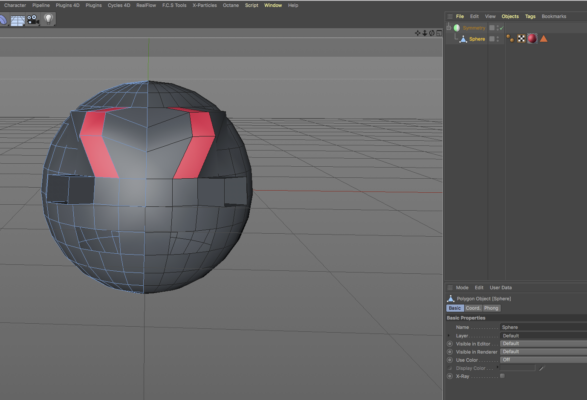
    View post on imgur.com

    Jim Scott replied 5 years, 2 months ago 2 Members · 3 Replies
  • 3 Replies
  • Jim Scott

    June 24, 2021 at 5:39 pm

    If you first select and delete one half of your polygon object, and then place it in a Symmetry object, any selections or modifications done to the original half will be repeated on the other half.

  • Tom ree

    June 24, 2021 at 9:30 pm

    Thanks! – So you’re saying there is no way of doing what I said while keeping both sides & simply making it edit the existing other side of the mesh? Just curious if it’s at all possible.

  • Jim Scott

    June 24, 2021 at 9:46 pm

    I can’t say that what you’re asking is impossible, but far as I know the only way to select/manipulate symmetrical attributes of an object is with the Symmetry object. Otherwise, I don’t know how C4D would be able to correlate one side of an object with the other and select and modify the appropriate polygons, points or edges. The Symmetry object is obviously just creating a mirror image of its child object, and manipulating both halves, but without doing that I don’t see how to accomplish what you’re looking for. If you find a way, please pass it on. Good luck.

We use anonymous cookies to give you the best experience we can.
Our Privacy policy | GDPR Policy